
How to Summarize YouTube Videos with AI: Best Tools in 2026
YouTube is one of the easiest places to learn something new, but not every video is worth watching from start to finish.
Sometimes a 45-minute lecture only has a few important points. Sometimes a tutorial takes too long to get to the real answer. And sometimes you just want to know what a video is about before spending your time on it.
This is where AI YouTube summarizer tools can help.
These tools can turn long YouTube videos into short summaries, key points, notes, timestamps, action steps, or even flashcards. They are useful for students, teachers, researchers, online learners, and anyone who watches educational videos regularly.
In this guide, I’ll show you how to summarize YouTube videos with AI, which tools are worth trying, how to summarize lectures automatically, and how to use AI summaries without missing the important details.
Best AI YouTube Summarizer Tools Compared
| Tool | Best For | Main Weakness |
|---|---|---|
| ChatGPT | Custom summaries, notes, flashcards, and quizzes | Needs a transcript for best results |
| NotebookLM | Lecture notes, research, and multi-source study | Not always the fastest option for one video |
| Glasp | Quick YouTube summaries with timestamps | Depends on transcript quality |
| Eightify | Fast summaries of long YouTube videos | May skip deeper context |
| NoteGPT | YouTube playlist summaries | Can become too broad |
Why Summarizing YouTube Videos with AI Is Useful
The biggest benefit is simple: time.
A 60-minute lecture may only contain 10 minutes of truly important information. An AI YouTube summarizer helps you find those important points faster.
But saving time is not the only benefit. AI summaries also help students review lessons, create study notes, prepare for exams, and understand long lectures more easily.
For example, if you are watching a biology lecture, you can ask AI to summarize the video into:
- simple notes
- important definitions
- exam-style questions
- key timestamps
- flashcard points
- a short revision sheet
That is much better than passively watching the video and forgetting half of it later.
If you are already using YouTube for study, you may also like this guide:
How to Take Notes from YouTube Lectures Using AI
How AI YouTube Summarizers Work
Most AI YouTube summarizer tools work by using the video transcript.
If a YouTube video has captions or an available transcript, the AI reads that text and turns it into a shorter version. Some tools create a quick summary. Others generate timestamps, key takeaways, questions, or detailed notes.
This is why videos with clear audio and proper captions usually produce better summaries.
NotebookLM, for example, can work with uploaded sources including websites, PDFs, text, and YouTube videos, which makes it useful for turning long learning material into organized notes.
That said, AI summaries are not perfect. If the transcript is wrong, incomplete, or auto-generated badly, the summary may also miss important points. That is why students should treat AI summaries as a study helper, not as a replacement for learning.
Best AI YouTube Video Summarizer Tools in 2026
There are several ways to summarize YouTube videos with AI. The best method depends on whether you want a quick summary, detailed lecture notes, or a study guide.
1. Use ChatGPT to Summarize YouTube Transcripts
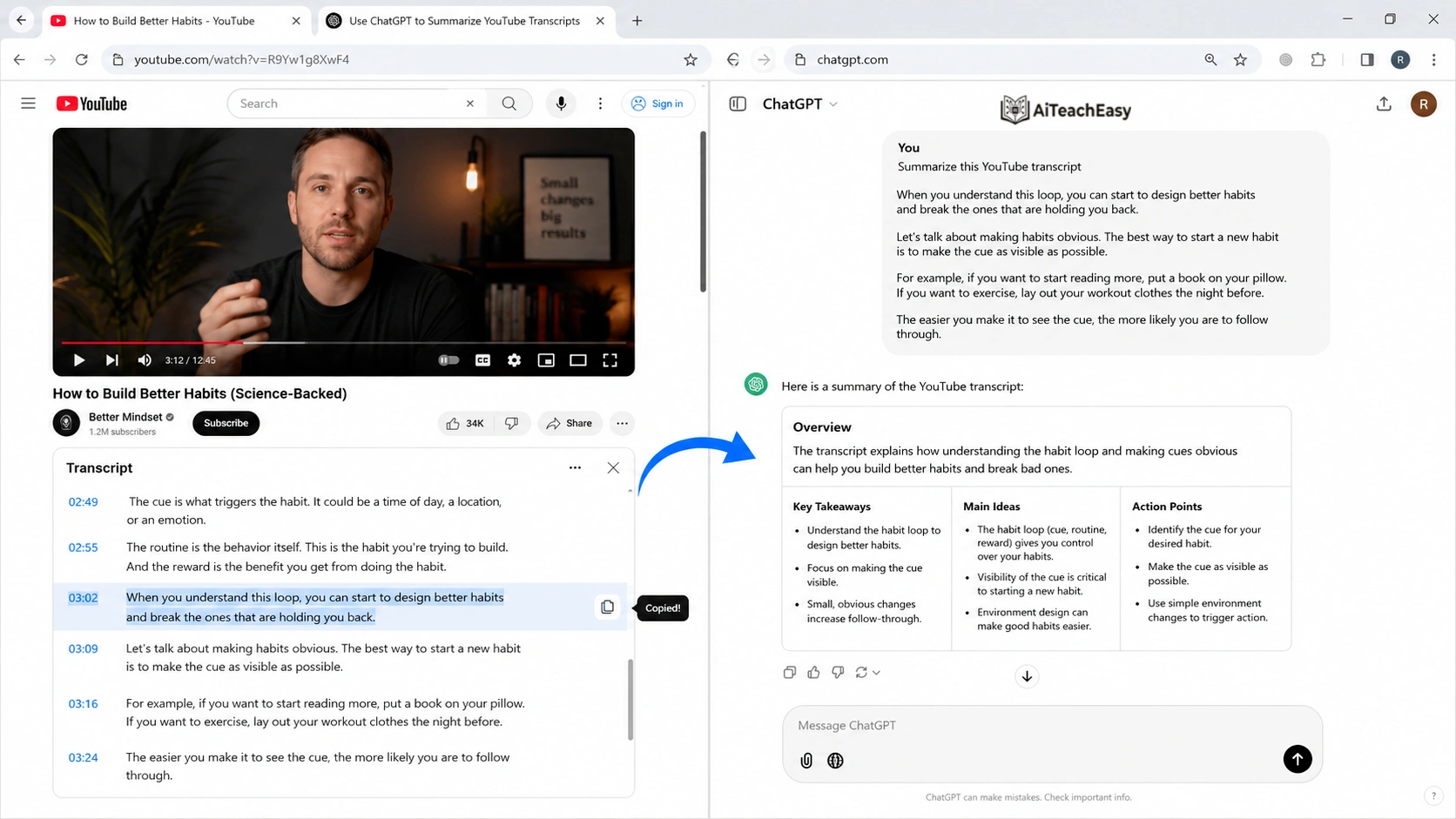
ChatGPT is one of the most flexible ways to summarize YouTube videos, especially if you want more than a basic one-paragraph summary. But there is one important thing to understand first: ChatGPT gives the best results when you provide the video transcript.
A lot of people simply paste a YouTube link and expect a perfect summary. Sometimes that may work depending on the tool or setup, but for the most accurate result, it is better to copy the transcript from the YouTube video and paste it into ChatGPT. This gives ChatGPT the actual content of the video, instead of forcing it to guess what the video is about.
Once you paste the transcript, you can ask ChatGPT to summarize the video in almost any format you want. This is what makes it more useful than many one-click YouTube summarizer tools. Most summarizer tools give you a fixed type of summary, but ChatGPT allows you to control the style, length, tone, and structure of the output.
For example, instead of writing a simple prompt like:
“Summarize this video.”
You can write a better prompt like:
“Summarize this YouTube lecture in simple student notes. Include the main ideas, key points, definitions, examples, important timestamps, and possible exam questions.”
This type of prompt usually gives a much better result because you are telling ChatGPT exactly what you need. If you are a student, you can ask for study notes. If you are a teacher, you can ask for lesson points. If you are a content creator, you can ask for content ideas, hooks, or a video outline.
Why I Like ChatGPT for YouTube Summaries
The main reason I like ChatGPT for YouTube summaries is the level of control it gives you. You are not limited to one type of summary. You can ask for a short summary, detailed notes, bullet points, a comparison table, flashcards, quiz questions, action steps, or even a simple explanation for beginners.
This makes ChatGPT especially useful for students and online learners. Sometimes you do not just want to know what a video says. You want to understand it properly and use it later for revision. ChatGPT can turn a long lecture into clean notes, break difficult ideas into simple language, and even create questions to test your understanding.
Another useful thing is that you can keep asking follow-up questions. For example, after getting the summary, you can ask:
“Explain point number three in easier words.”
Or:
“Turn this summary into flashcards.”
Or:
“Create 10 MCQs from this lecture.”
This makes ChatGPT feel more like a study assistant than a simple summarizer. It does not just shorten the video; it can help you learn from it.
ChatGPT is also helpful when the video is long, confusing, or full of unnecessary explanation. Many YouTube lectures include repeated points, long introductions, or extra examples. ChatGPT can remove the noise and organize the useful information in a cleaner way.
However, it is still important to check important details from the original video, especially if the topic is technical, academic, medical, legal, or financial. AI summaries are useful, but they are not always perfect. The quality of the summary depends on the quality of the transcript and the clarity of your prompt.
Overall, ChatGPT is a strong choice if you want a custom YouTube video summary. It is best for students, teachers, researchers, and anyone who wants summaries in a specific format instead of a simple automatic overview.
How to Convert Notes into Flashcards
Where ChatGPT Can Struggle
ChatGPT may not automatically access every YouTube video directly, depending on the version, settings, browser access, or transcript availability. If you want reliable results, copy the transcript yourself or use a transcript tool first.
Also, very long transcripts may need to be pasted in parts.
So my honest recommendation is this: use ChatGPT when you want the best customized summary, not necessarily the fastest one-click summary.
2. Use NotebookLM for Lecture Summaries and Study Notes
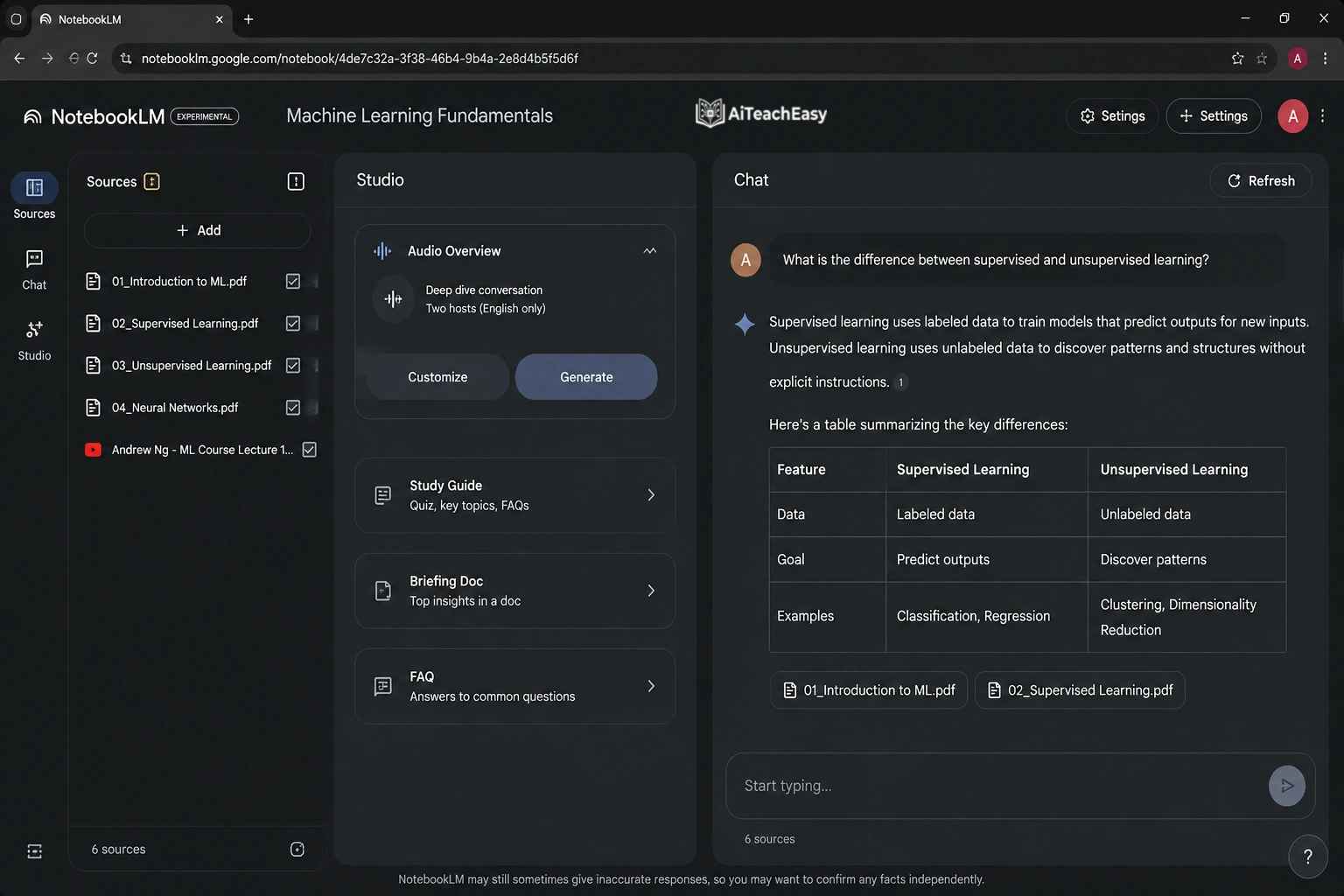
NotebookLM is one of the best tools for students, researchers, and serious learners who want to summarize YouTube lectures and keep their study material organized in one place.
The biggest difference between NotebookLM and many other AI summarizer tools is that NotebookLM is built around sources. Instead of only giving you a quick summary, it lets you add learning material, organize it into notebooks, and ask questions based on the sources you upload or provide.
This makes it very useful when you are not just watching one video, but studying a full topic. For example, you may have a YouTube lecture, a PDF, class notes, slides, and an article. NotebookLM can help you work with all of these sources together instead of keeping everything separate.
This is why NotebookLM feels more like a study and research assistant than a simple YouTube summary tool.
With NotebookLM, you can use your sources to create summaries, study guides, key points, questions, explanations, and learning notes. This is especially helpful for students who want to understand a topic properly instead of only getting a short overview.
When NotebookLM Works Best
NotebookLM works best when you are dealing with longer learning projects. For example, if you are preparing for an exam, researching a topic, or studying a full course, NotebookLM can be much more useful than a basic summarizer.
You can add multiple YouTube lectures, PDFs, notes, and study documents into one notebook. After that, you can ask questions across all of your material.
For example, you can ask:
“What are the main concepts explained in these lectures?”
Or:
“Create a study guide from these YouTube videos and notes.”
Or:
“Explain the most important points from these sources in simple student language.”
This makes NotebookLM powerful because it does not only summarize one video. It helps you connect ideas from different sources. That is useful when you are studying a subject where one video alone is not enough.
For students, this can save a lot of time. Instead of opening different tabs, reading PDFs separately, and watching long lectures again and again, you can keep your material in one place and ask NotebookLM to help you understand it.
NotebookLM is also helpful when a lecture is difficult or full of technical language. You can ask it to explain the topic in easier words, create revision notes, or turn the material into questions for practice.
Why I Like NotebookLM for Study
The main reason I like NotebookLM is that it is better for organized learning. Many YouTube summarizer tools are good for quick summaries, but they do not always help you study deeply.
NotebookLM is different because it is designed for working with sources. This makes it useful for students who want to build proper notes from lectures, not just read a short summary.
You can use it to create:
- Simple lecture notes
- Study guides
- Key concepts
- Revision points
- Questions and answers
- Topic explanations
- Summaries from multiple sources
This makes it a strong option for exam preparation, research work, online courses, and academic learning.
What I Don’t Like About NotebookLM
NotebookLM is not always the fastest option if you only want a quick summary of one random YouTube video. For example, if you just want to know the main points of a 10-minute video, a browser extension like Glasp or Eightify may feel faster.
NotebookLM works better when you are doing serious study or research. It may take a little more setup because you need to add your sources and organize your notebook. So, for quick one-video summaries, it may feel like more effort than needed.
Another thing to remember is that the quality of the result still depends on the quality of your sources. If the transcript is poor, incomplete, or unclear, the summary may also miss some details.
Overall, NotebookLM is a great choice for students and researchers who want to summarize YouTube lectures, organize study material, and create better learning notes from multiple sources. It may not be the quickest tool for a simple summary, but for serious study and long-term learning, it is one of the strongest options.
Related guide:
Best AI Tools for Online Classes
3. Use Glasp YouTube Summary for Quick Summaries
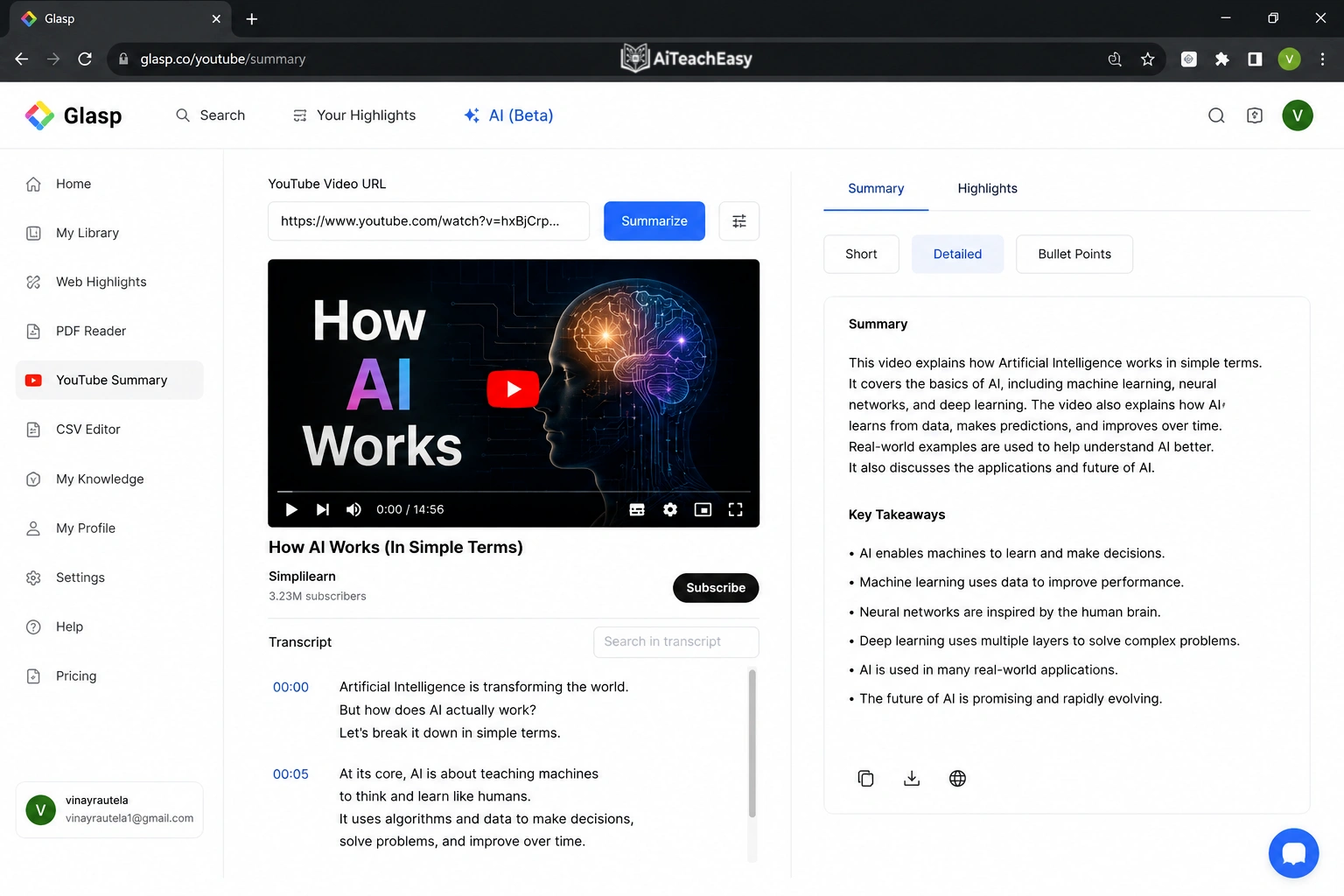
Glasp is a good option for people who want to summarize YouTube videos quickly without doing too much manual work. It is especially useful when you do not want to copy the full transcript, paste it into another tool, and then write a detailed prompt yourself.
With Glasp, the process feels simple. You open a YouTube video, use the tool or browser extension, and it gives you a summary of the video. In many cases, it can also show key takeaways, timestamps, and transcript-based summaries. This makes it helpful when you want to understand the main points of a video without watching the full thing.
For example, if a video is 30 or 40 minutes long, you may not want to sit through the whole introduction, repeated examples, or extra explanation. Glasp can help you quickly see what the video is about and whether it is worth watching in full.
This makes it a useful tool for students, online learners, content creators, researchers, and anyone who watches a lot of educational or informational videos on YouTube.
Why Glasp Is Useful
The main reason Glasp is useful is speed. It is built for quick summaries, so you do not need a complicated setup. This is helpful when you are watching a tutorial, lecture, podcast clip, productivity video, or educational content and only want the main ideas.
Glasp is also helpful because of timestamped summaries. Timestamps are important because they let you jump directly to the part of the video that matters. Instead of dragging the video timeline again and again to find the useful section, you can go straight to the point you need.
For example, if a tutorial explains the real answer after 18 minutes, a timestamped summary can help you reach that part faster. This saves time and makes learning more focused.
Glasp can also be useful for content research. If you are a YouTuber, blogger, or marketer, you can use it to quickly understand what other videos are covering. Instead of watching every video from beginning to end, you can scan the summary and collect useful ideas.
When Glasp Works Best
Glasp works best when you want a fast overview of a YouTube video. It is a good choice for videos where you only need the main points, key ideas, or important timestamps.
It is useful for:
- Quick lecture summaries
- Productivity videos
- Tutorials
- Educational videos
- Research videos
- Content idea research
- Videos you want to preview before watching fully
Glasp is also a nice option when you are checking multiple videos on the same topic. You can quickly compare summaries and decide which video is actually worth your time.
What I Don’t Like About Glasp
The main weakness of Glasp is that the summary depends heavily on the transcript or captions of the video. If the YouTube video has clear captions, the summary is usually much better. But if the captions are missing, auto-generated badly, or the audio quality is poor, the summary may not be as accurate.
Another thing to keep in mind is that Glasp is better for quick summaries than deep study notes. It can give you the main ideas, but if you want detailed explanations, flashcards, exam questions, or a full study guide, ChatGPT or NotebookLM may be better.
For this reason, I would use Glasp when I need a fast summary or timestamped overview. Then, if the video is important, I would use ChatGPT to turn the transcript or summary into deeper notes, flashcards, or revision material.
Overall, Glasp is a strong choice for quick YouTube summaries. It is simple, fast, and useful when you want to save time. It may not replace a full study tool, but for getting the main points of a video quickly, it does the job well.
4. Use Eightify for Short YouTube Video Summaries
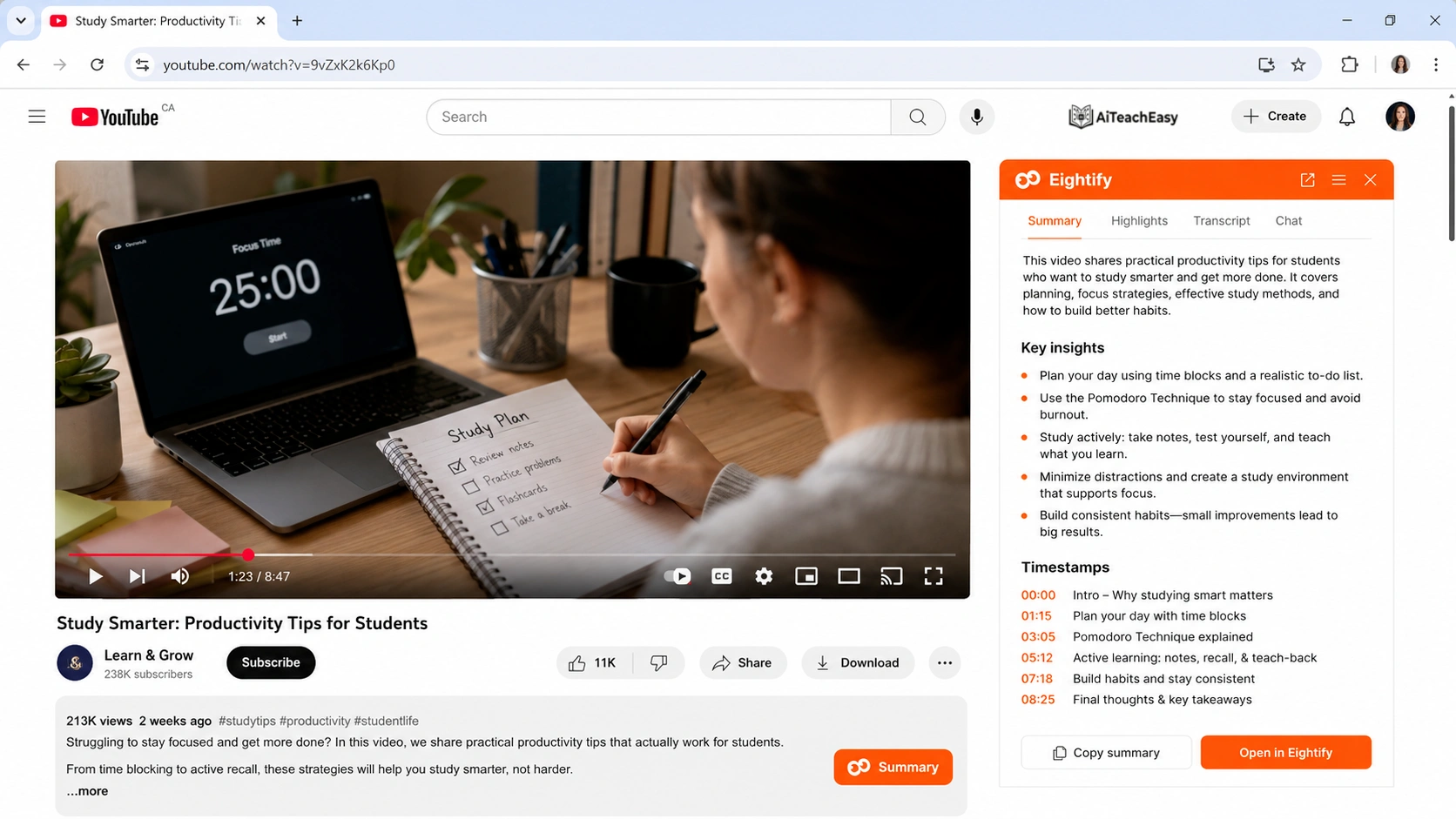
Eightify is a useful tool for people who want to understand a YouTube video quickly without watching the whole thing. It is made for fast summaries, so it works well when you only need the main ideas, key points, and overall message of a video.
This can be very helpful when a video is too long, too slow, or full of extra discussion. Instead of spending 40 minutes or 90 minutes watching everything, you can use Eightify to get a quick idea of what the video covers.
Eightify is especially useful for long YouTube videos, podcasts, interviews, tutorials, business videos, and educational content. It helps you decide whether a video is actually worth your time before you commit to watching it fully.
When Eightify Makes Sense
Eightify makes the most sense when you want a quick overview before watching a video.
For example, imagine you find a 90-minute podcast about AI tools for students. The title looks interesting, but you are not sure if the full video is useful. Instead of watching the entire podcast, you can summarize it first with Eightify.
After reading the summary, you can quickly decide whether the video has enough value. If the summary looks useful, you can watch the important parts. If it looks basic or repetitive, you can skip it and save your time.
This is where Eightify becomes very practical. It helps you avoid wasting time on videos that look useful from the title but do not really give much value.
It is also useful when you are comparing several videos on the same topic. Instead of opening each video and watching 10 to 15 minutes from each one, you can summarize them and quickly choose the best one.
Why Eightify Is Useful
The biggest benefit of Eightify is speed. It gives you the main points without needing much effort. You do not have to copy the transcript manually or write a detailed prompt. You can use it to get a quick understanding of the video and move on.
This makes it helpful for people who watch a lot of content every day. Students can use it to preview lectures. Creators can use it to research other videos. Professionals can use it to summarize webinars, interviews, and business talks.
Eightify is also good when you are not trying to study deeply. Sometimes you only need a basic idea of what the video says. In that case, a short summary is enough.
Where Eightify Falls Short
The main weakness of Eightify is that short summaries can sometimes remove too much context. A video may include examples, explanations, warnings, or small details that are important, but a quick summary may skip them.
This matters more when you are studying for an exam, learning a difficult topic, or working with technical information. In those cases, a short summary may help you understand the basic idea, but it may not be enough for proper learning.
Another thing to remember is that, like other YouTube summarizer tools, the quality of the summary depends on the video’s transcript, captions, and audio clarity. If the transcript is poor, the summary may also miss important points.
My Opinion on Eightify
I would use Eightify as a first-step tool. It is great for getting a quick overview and deciding whether a video is worth watching. It saves time and helps you filter low-value videos quickly.
But for serious study, I would not depend on Eightify alone. If the video is important, I would use Eightify first to understand the main idea, then use ChatGPT or NotebookLM to create deeper notes, flashcards, questions, or a proper study guide.
Overall, Eightify is a strong choice for quick YouTube summaries. It is best for people who want speed, simple key points, and a fast way to decide which videos are worth watching.
5. Use NoteGPT for YouTube Video and Playlist Summaries
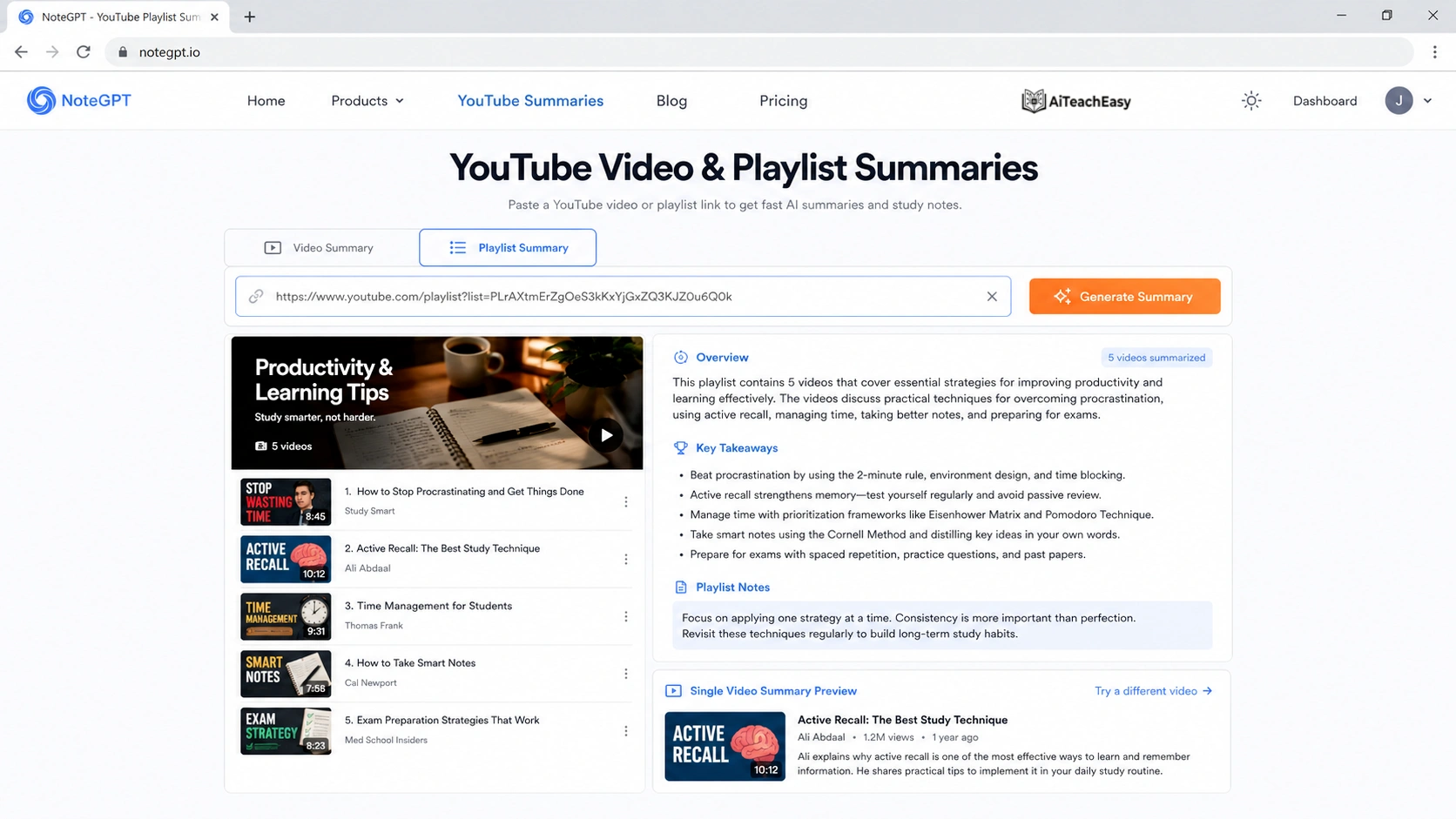
NoteGPT is a useful option when you want to summarize more than one YouTube video. Many AI summarizer tools are good for a single video, but NoteGPT can be helpful when you are working with a full YouTube playlist or a course-style series.
This makes it a good choice for students and online learners. For example, if you are learning Python, English grammar, chemistry, digital marketing, or any other subject from a YouTube playlist, summarizing every video one by one can take a lot of time. NoteGPT can make that process easier by helping you pull out the main ideas from the videos more quickly.
Instead of watching a full playlist from beginning to end just to find the important parts, you can use NoteGPT to get summaries, notes, and a general understanding of the content first. This helps you decide which videos need your full attention and which ones you can review quickly.
When NoteGPT Works Best
NoteGPT works best for course-style YouTube content. This means videos where one topic is explained across several lessons, chapters, or parts.
For example, a YouTube playlist might have:
- Lesson 1: Introduction to Python
- Lesson 2: Variables and data types
- Lesson 3: If-else statements
- Lesson 4: Loops
- Lesson 5: Functions
If you summarize these videos manually, it can take a long time. A tool like NoteGPT can help you create a clearer overview of the full playlist and understand how the lessons connect with each other.
This is useful because many educational YouTube playlists are long. Some have 10 videos, while others may have 50 or more. If you are preparing for exams, learning a new skill, or reviewing a course, having summaries can save a lot of time.
Why NoteGPT Is Useful
The main benefit of NoteGPT is that it can help organize learning from multiple videos. Instead of treating each video separately, it can be useful when you want to understand a bigger topic.
You can use it to create:
- Chapter summaries
- Lecture notes
- Topic outlines
- Revision material
- Key points from each video
- A simple overview of a full playlist
This makes NoteGPT helpful for students who are using YouTube as a free learning platform. It can also be useful for teachers, tutors, bloggers, and content creators who need to review many videos on the same topic.
For example, if you are writing an article about a subject and want to understand what popular YouTube courses are covering, NoteGPT can help you scan the playlist faster. You can quickly see the main topics, important lessons, and repeated ideas.
Best Use Case
The best use case for NoteGPT is summarizing educational playlists. It is especially helpful when a topic is divided into multiple videos and you want to create notes from the full series.
For students, this can be useful for subjects like programming, science, English, history, business, or exam preparation. Instead of making notes from scratch, you can use the summaries as a starting point and then improve them with your own understanding.
NoteGPT can also help when you want to revise a course. You may not have time to rewatch every lecture, but a good summary can remind you of the main points and help you decide which video to revisit.
What to Watch Out For
The main thing to watch out for is that playlist summaries can sometimes become too general. When a tool tries to compress many videos into a short summary, it may skip examples, small explanations, or important details.
This can be a problem if you are studying for exams, working on assignments, or learning a technical subject. A summary can help you review faster, but it should not fully replace the original lectures when the topic is important.
It is also a good idea to check the key videos yourself. If one lecture explains an important formula, coding concept, grammar rule, or exam topic, you should still watch that part carefully.
My Opinion on NoteGPT
I would use NoteGPT when I need to summarize a full YouTube playlist or course. It is useful for getting a clear overview, making rough notes, and saving time during revision.
But I would not depend on it completely for serious study. For important lessons, I would use NoteGPT to create the first summary, then check the original video and improve the notes myself.
Overall, NoteGPT is a strong choice for students and learners who use YouTube playlists for study. It is especially helpful when you want to turn long course-style content into organized notes, outlines, and revision material.
How to Summarize Lectures Automatically with AI
If your goal is to summarize lectures automatically, do not just generate a short paragraph summary. That is usually not enough for studying.
A better lecture summary should include:
- main topic of the lecture
- key concepts explained
- important definitions
- examples used by the teacher
- formulas or steps if included
- timestamps for important sections
- exam-style questions
- short revision notes
Here is a strong prompt you can use:
Summarize this YouTube lecture for a student. Include the main topic, key concepts, important definitions, examples, timestamps if available, and 10 exam-style questions at the end.
This kind of summary is much more useful than a simple “short summary.”
If you are using AI to study faster, also read:
How to Learn Anything 10x Faster
Best AI Tools for Exam Preparation
Best AI Tools for Memorization
The AI tool you use is important, but the prompt you give it is just as important.
Many people get poor summaries because they ask very basic questions like, “Summarize this video.” That prompt may work, but the result is usually too simple. It may miss useful details, examples, timestamps, or study points.
A better prompt tells the AI exactly what you want. You can ask for a short summary, student notes, timestamps, flashcards, quiz questions, or a full lecture breakdown. The clearer your prompt is, the better the summary will be.
For the best results, first copy the YouTube transcript and paste it into your AI tool. Then use one of the prompts below depending on what you need.
Prompt for a Simple Summary
Use this prompt when you only want the main idea of the video without extra detail.
Prompt:
Summarize this YouTube video in simple language. Focus only on the most important ideas and remove repeated points. Keep the summary clear, short, and easy to understand.
This prompt is useful when you want to quickly understand what a video is about before deciding whether to watch it fully.
Prompt for Student Notes
Use this prompt if you are watching a lecture, tutorial, or educational video and want notes that you can study later.
Prompt:
Turn this YouTube video transcript into clear student notes. Use headings, short explanations, examples, and key terms. Make the notes easy to revise before an exam.
This works well for school, college, online courses, and self-study.
Prompt for a Lecture Summary
Lecture videos often contain definitions, examples, formulas, and long explanations. A normal summary may skip some of these details, so it is better to ask for a study-focused summary.
Prompt:
Summarize this lecture into detailed study notes. Include the main topic, important definitions, formulas, examples, key concepts, and possible exam questions. Explain difficult points in simple language.
This prompt is useful for students who want to understand the lecture properly, not just read a short overview.
Prompt for a Timestamped Summary
A timestamped summary is helpful when you want to jump directly to the useful parts of a video.
Prompt:
Create a timestamped summary of this YouTube video. Divide the video into major sections, mention the timestamp for each section, and explain the key idea covered in that part.
This is useful for long tutorials, podcasts, interviews, and lectures where only some parts may be important.
Prompt for Flashcards
Flashcards are useful when you want to revise the video later or test your memory.
Prompt:
Convert this YouTube video transcript into flashcards. Write a question on one side and a short answer on the other side. Focus on important facts, definitions, examples, and key concepts.
This prompt works well for exam preparation, language learning, science topics, history, and technical subjects.
Prompt for Quiz Questions
Use this prompt when you want to test yourself after watching or summarizing a video.
Prompt:
Create quiz questions from this YouTube video transcript. Include multiple-choice questions, short-answer questions, and answer keys. Focus on the most important learning points.
This is helpful for students, teachers, and online learners who want to check understanding.
Prompt for Action Steps
Some YouTube videos are practical, like productivity videos, business tutorials, fitness guides, or step-by-step how-to videos. For these videos, action steps are more useful than normal notes.
Prompt:
Summarize this YouTube video into clear action steps. Remove unnecessary explanation and show exactly what I should do first, next, and last.
This prompt is best for tutorials, guides, business advice, and self-improvement videos.
Prompt for Beginners
Use this prompt when the topic feels difficult or technical.
Prompt:
Explain this YouTube video in beginner-friendly language. Avoid difficult words where possible, and explain every important idea as if I am new to the topic.
This is useful for coding, science, finance, AI, grammar, and other topics that may feel confusing at first.
My Favorite Prompt
If you want one strong prompt that works for most educational videos, use this:
Summarize this YouTube video transcript into clear study notes. Start with a short overview, then list the main points with headings. Include important definitions, examples, key takeaways, and possible exam questions. Remove repeated points and explain difficult ideas in simple language.
This prompt gives a much better result than a basic summary because it tells the AI what format to follow and what details to include.
You can connect this workflow with tools like ChatGPT, NotebookLM, Glasp, Eightify, or NoteGPT depending on whether you need quick summaries, lecture notes, flashcards, or full study material.
How to Convert Notes into Flashcards
Are AI YouTube Summaries Accurate??
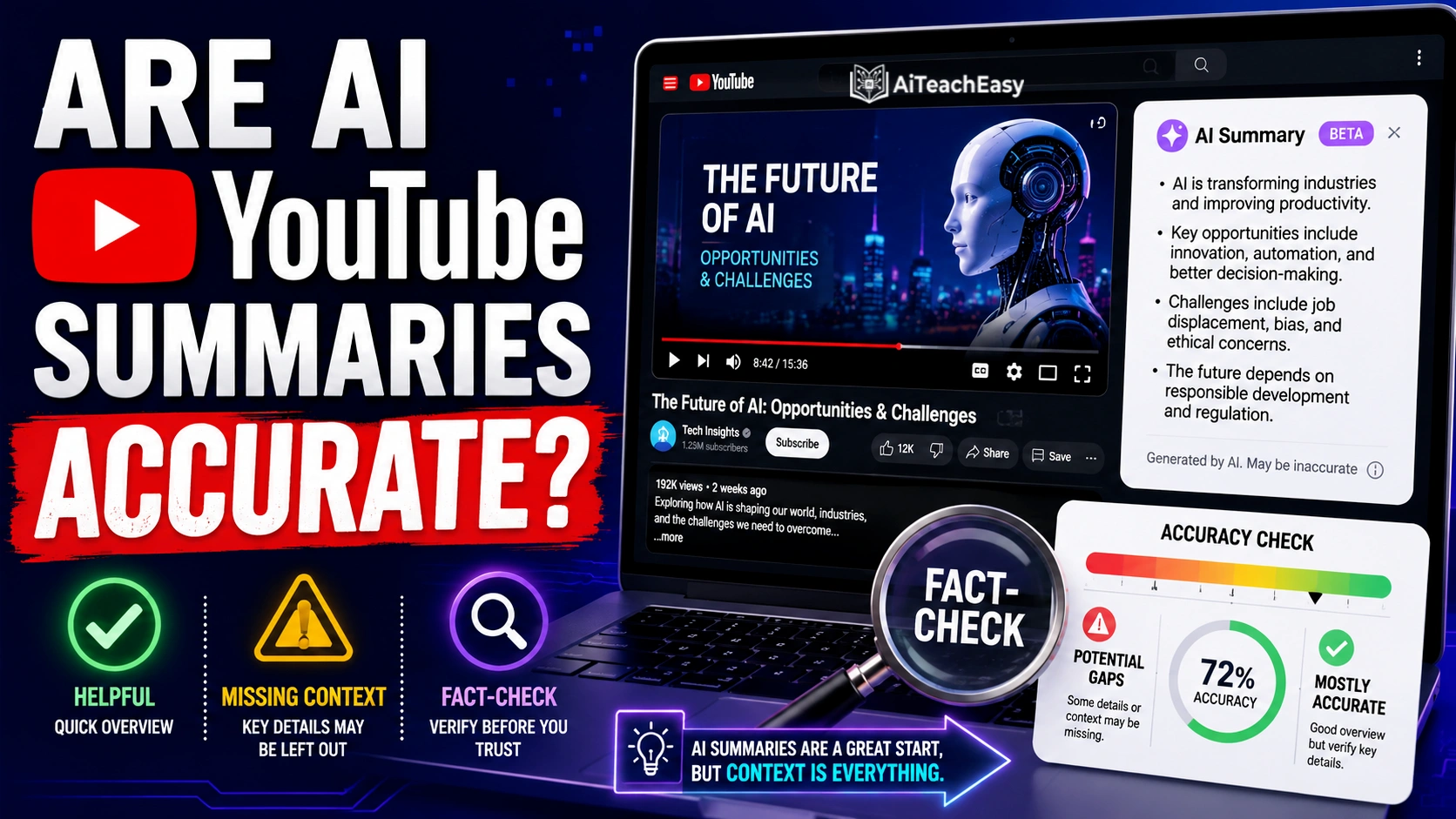
Yes, AI YouTube summaries can be accurate, but they are not perfect every time.
The accuracy mostly depends on the quality of the video transcript. If the YouTube captions are clear and the speaker explains the topic properly, the AI summary is usually helpful. But if the transcript has mistakes, missing words, poor punctuation, or badly generated captions, the summary can also miss important points.
AI tools may also struggle when the video includes sarcasm, jokes, unclear speech, background noise, strong accents, or highly technical terms. In these cases, the AI may understand the words but miss the real meaning behind them.
That is why AI summaries should be used as a helpful shortcut, not as a complete replacement for watching the original video.
For casual videos, quick learning, and general understanding, AI summaries are usually enough to get the main idea. But for exams, research, assignments, medical topics, legal information, financial advice, or technical tutorials, you should always check the important parts yourself.
A better way to use AI YouTube summaries is this:
First, generate the AI summary.
Then, read the key points and note anything that looks important.
After that, check the original video around the important timestamps.
Finally, verify any point that seems confusing, serious, or too important to trust without checking.
This method saves time without making you depend blindly on AI. You still get the benefit of a fast summary, but you also reduce the risk of missing important details.
In simple words, AI YouTube summaries are useful for understanding the main ideas of a video, but they should always be checked when accuracy really matters.
My Honest Recommendation
If you want the fastest YouTube summary AI tool, use Glasp or Eightify.
If you want the best study notes, use ChatGPT with the transcript.
If you are summarizing full lectures or combining YouTube videos with PDFs and class notes, use NotebookLM.
If you are summarizing a full YouTube playlist, try NoteGPT.
For students, my favorite workflow is:
Use Glasp or YouTube transcript to get the text.
Paste the transcript into ChatGPT.
Ask ChatGPT to create study notes.
Turn the notes into flashcards.
Use the flashcards for revision.
That workflow is much better than only reading a short summary and forgetting it later.
Who Should Use These AI YouTube Summarizer Tools?
Different people use YouTube summaries for different reasons. Some want quick notes for study, some want to save time on long videos, and others need a simple way to pull useful points from lectures, tutorials, or research videos. Here is a simple breakdown.
Students
Students can use tools like ChatGPT and Claude to turn long lectures into short notes, simple explanations, flashcards, and exam revision points.
YouTubers and Content Creators
Creators can use Notta and Glasp to pull key ideas from videos, study competitors, collect timestamps, and prepare content outlines faster.
Researchers
Researchers can use Claude and Gemini to review long interviews, educational videos, panel talks, and research-based content without watching every minute.
Quick Summary Users
If you only want the main points of a video, Eightify and Glasp are good options. They are useful when you want to decide quickly whether a video is worth watching.
Final Thoughts
Learning from YouTube is powerful, but it can waste a lot of time if you watch every video from start to finish.
AI changes that.
With the right AI YouTube summarizer, students can summarize lectures automatically, create notes, generate flashcards, and review lessons faster. Teachers can also use these tools to prepare class material, simplify long videos, and create quick learning resources.
The key is to use AI summaries wisely. Do not treat them as perfect replacements for the original video. Treat them as a faster way to understand, review, and organize information.
Used properly, AI can turn a long YouTube video into something much more useful: clear notes you can actually study from.
For most users, ChatGPT is the best overall choice because it can summarize, explain, and rewrite YouTube content in different formats. For quick summaries, Glasp and Eightify are better options.
Final Recommendation
The best AI YouTube summarizer depends on how you plan to use it. Some tools are better for study notes, while others are better for quick summaries, long lectures, or videos with visual content.
| User Type | Best Tool | Action |
|---|---|---|
| Students | ChatGPT | Visit Tool |
| Researchers | Claude | Visit Tool |
| Quick summaries | Glasp | Visit Tool |
| Long lectures | Notta | Visit Tool |
| Visual/video analysis | Gemini | Visit Tool |
FAQs : How to Summarize YouTube Videos with AI
What is the best AI tool to summarize YouTube videos?
ChatGPT, NotebookLM, Glasp, Eightify, and NoteGPT are some of the best tools to summarize YouTube videos with AI. ChatGPT is best for custom study notes, while Glasp and Eightify are better for quick summaries.
Can AI summarize YouTube lectures automatically?
Yes, AI tools can summarize YouTube lectures automatically when a transcript is available. Tools like NotebookLM, Glasp, Eightify, and ChatGPT can help turn lectures into notes, key points, and study guides.
Is there a free AI YouTube summarizer?
Yes, some AI YouTube summarizer tools offer free access or free basic versions. Glasp, ChatGPT, NotebookLM, and some browser extensions can help summarize videos for free, depending on usage limits.
How do I summarize a YouTube video using ChatGPT?
Copy the YouTube transcript, paste it into ChatGPT, and ask it to summarize the video into key points, study notes, timestamps, or flashcards.
Can AI summarize YouTube videos without transcripts?
Some tools may still attempt summaries using captions or extracted audio, but summaries are usually better when a transcript is available. Poor audio or missing captions can reduce accuracy.
What is the best YouTube summary AI for students?
For students, ChatGPT and NotebookLM are strong choices because they can turn YouTube lectures into study notes, questions, flashcards, and revision material.
Are AI YouTube summaries accurate?
AI YouTube summaries can be helpful, but they are not always perfect. Accuracy depends on transcript quality, audio clarity, and the complexity of the video. Always check important details in the original video.
About the Author
Prof. Irfan
Prof. Irfan writes about AI tools, student learning, classroom technology, and practical study workflows. His goal is to help students and teachers use AI in a smart and responsible way — not as a shortcut, but as a learning partner.
His guides focus on practical topics like AI note-taking, homework support, exam preparation, YouTube learning, flashcards, online classes, and productivity tools.
Explore more guides on AI Teach Easy.