
Student Result Sheet Generator
Student Result Sheet Generator Free In Excel
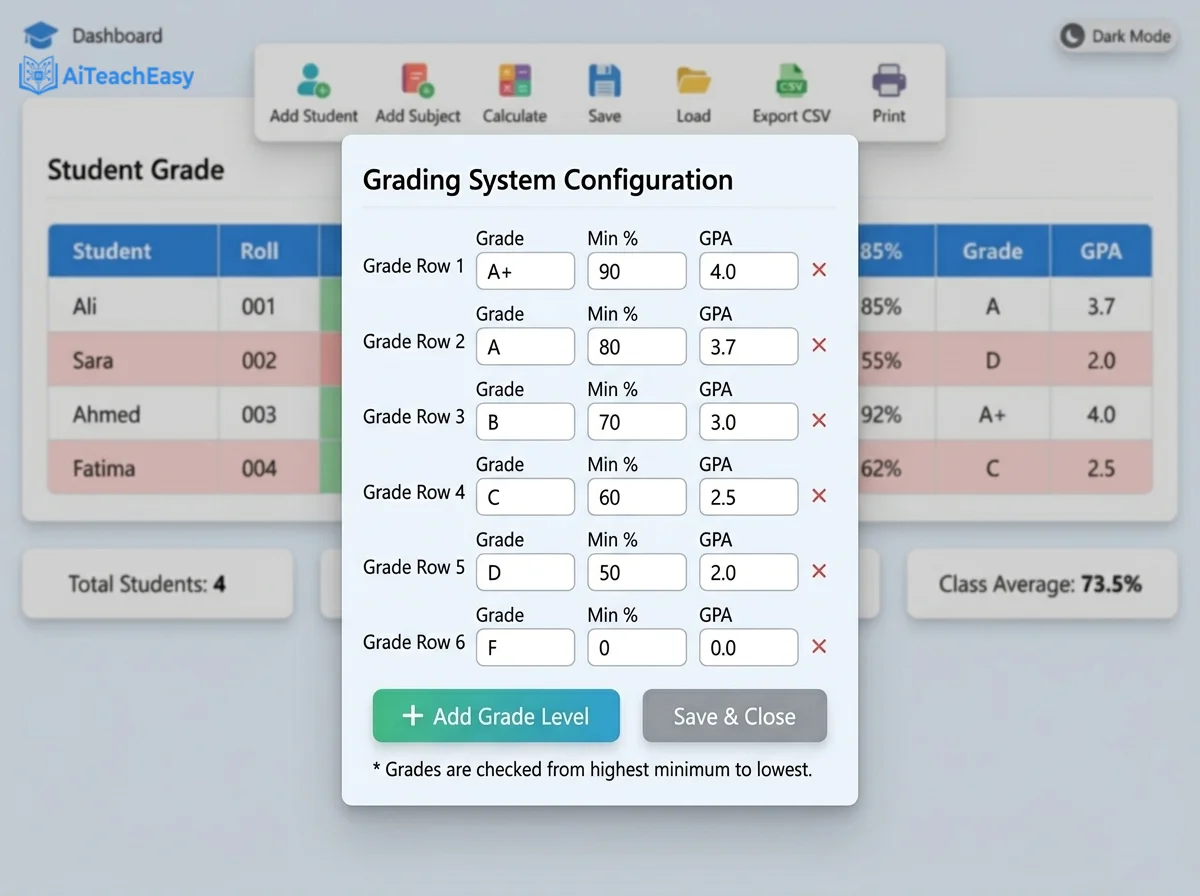
Grading System Configuration
Are you tired of wrestling with complex Excel result sheet formulas every term? Do you spend hours fixing broken VLOOKUPs or manually calculating GPAs? You’re not alone. Thousands of teachers and administrators search for a student result sheet generator free in Excel each year, only to find themselves trapped in a cycle of spreadsheet errors and time‑consuming formatting.
In this post, I’ll introduce you to a modern alternative – a free online result sheet generator that handles everything automatically. No formulas, no debugging, no headaches. Whether you need an automated marksheet, a GPA calculator for teachers, or a complete digital gradebook, this tool delivers. And the best part? It runs right in your browser, requires no installation, and is completely free.
Think of this as an Excel Web Add-on that handles the hard work – automated grading, instant ranking, and student performance analytics – then gives you a clean, Excel-compatible CSV file at the end. You get the best of both worlds: the power of a purpose‑built tool with the familiarity of spreadsheet export.
Table of Contents
Why I Built This Tool (Real‑World Experience)
As a former classroom teacher, I’ve lived the pain of preparing report cards with Excel. I remember the sinking feeling when I discovered a formula error after printing 30 reports. I built this school report card maker to give educators a reliable, instant solution. Every feature was shaped by feedback from real teachers – from dynamic subjects to the attendance penalty.
This tool reflects my commitment to making academic record management accessible to everyone, whether you’re tech‑savvy or just starting your teaching journey.
What is a Student Result Sheet Generator?
A student result sheet generator is software that helps educators record, calculate, and analyze academic performance. Traditional methods rely on Excel templates, but these require manual setup and constant maintenance. Our tool automates the entire process:
- Automatic calculation of totals, percentages, grades, and GPA
- Instant ranking and pass/fail highlighting
- Customizable grading scales to match any institution
- Attendance penalty integration for holistic evaluation
- Termly results tracking across multiple assessment periods
Think of it as a digital gradebook on steroids – built specifically for educators, not spreadsheet experts. For tech‑savvy teachers, it even functions as an automated grading script that you can inspect and modify.
Why Online Result Generators Outperform Excel
| Feature | Basic Excel Template | Our Free Online Tool |
|---|---|---|
| Setup Time | 30–60 minutes | Instant – just open the page |
| Formula Errors | Common (VLOOKUP, IF, RANK) | Zero – logic is built‑in |
| Subject Changes | Requires restructuring columns and formulas | One‑click add/remove |
| Grading Scale | Manual lookup or nested IFs | Fully configurable via settings panel |
| Mobile Friendly | No | Yes – responsive design |
| Auto‑Ranking | Requires complex RANK.EQ formulas | Automatic |
| Dark Mode | Manual tweaking | One‑click toggle |
| Data Export | Save as .xlsx (manual) | CSV, Print, PDF with one click |
| Excel Compatibility | Native | CSV export opens perfectly in Excel |
If you absolutely must stay in Excel, you can download a template from Microsoft’s official Excel support page, but after comparing the time saved, you’ll never go back. Our CSV export is 100% Excel‑compatible – simply download, open in Excel, and format as needed. It’s the perfect bridge between automated calculation and spreadsheet familiarity.
Key Features of Our Free Result Sheet Maker
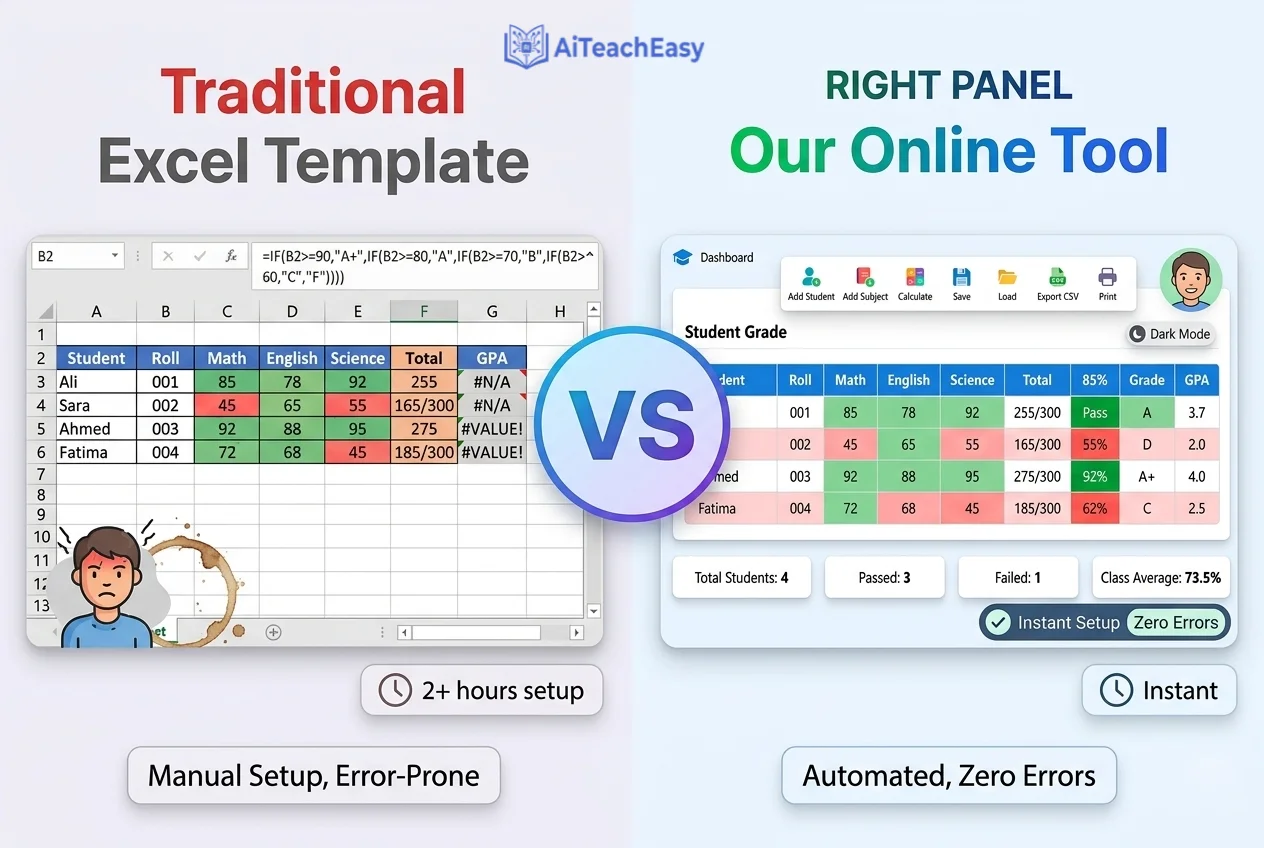
1. Dynamic Subjects with Individual Max Marks
Add or remove subjects anytime. Each subject has its own maximum marks, editable inline. Perfect for schools with changing curricula or multiple class sections. This flexibility makes academic record management effortless.
2. Fully Customizable Grade Scale
Click the Grade Scale button to define your own grades, percentage thresholds, and GPA values. Add as many levels as you need – the system updates every student’s record instantly. This is the GPA calculator for teachers you’ve been looking for.
3. Real‑Time Calculation
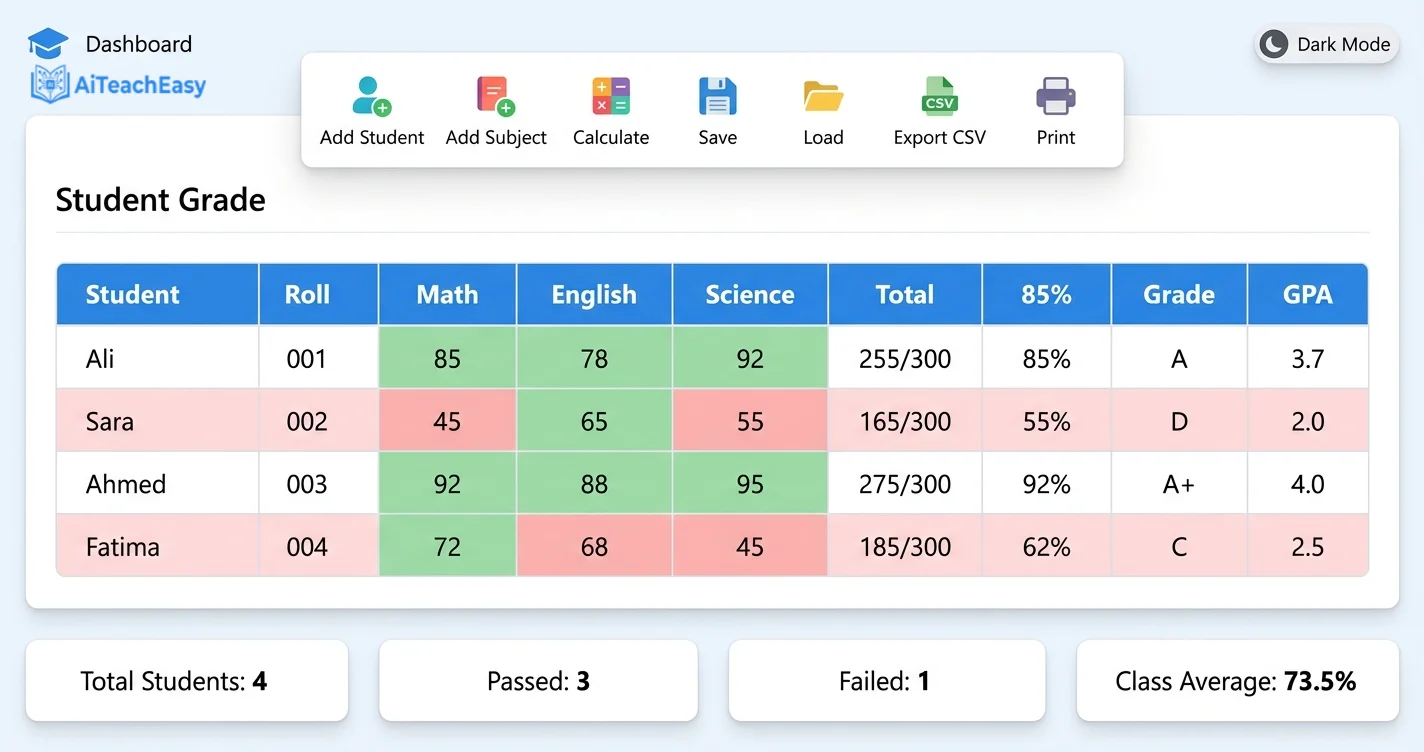
As you type marks, the total, percentage, grade, GPA, and class rank update live. Subject cells turn green (pass) or red (fail) based on your pass threshold. Rows that result in a fail are lightly shaded for quick scanning. This student performance analytics dashboard gives you instant insights.
4. Attendance Penalty
Research shows attendance directly impacts success. Our tool lets you set a minimum attendance (default 75%). If a student falls below, their grade is automatically reduced, and a comment is added. This encourages accountability without extra work for you.
5. Comprehensive Data Management
- Save/Load: Store everything – subjects, grade scale, student data – in your browser’s local storage.
- CSV Import/Export: Import from existing Excel sheets (with optional
MAX_MARKSrow to preserve subject maxima). Export CSV files for backup or sharing. The exported file opens flawlessly in Excel, making it ideal for termly results reporting. - Print View: Click Print PDF to generate a clean, button‑free report sheet, perfect for official records.
6. Undo/Redo (Ctrl+Z)
Made a mistake? Undo any action, from editing marks to deleting a row. The history stack keeps you safe.
7. Sort, Filter & Search
- Click any column header to sort students by name, roll, marks, or grade.
- Use the search box to filter rows in real time – ideal for locating a single student.
8. Dark Mode
Late‑night grading? Toggle Dark Mode for a comfortable, low‑light interface.
How to Use the Student Result Sheet Generator (Step‑by‑Step)
- Open the Tool – No sign‑up, no cost. Just load the HTML file or access it online.
- Configure Your Grading System – Click Grade Scale to edit grade names, minimum percentages, and GPA values. (For more on GPA calculation, check out our Free Offline CGPA Calculator.)
- Set Pass Threshold & Attendance Penalty – Adjust the sliders to match your school’s policy.
- Add Subjects (Optional) – Click Add Subject and name it. The column appears instantly.
- Enter Student Data – Type names, roll numbers, marks, and attendance. Watch results appear automatically.
- Save or Export – Use Save (localStorage) or Export CSV / Print PDF. The CSV file is ready for Excel.
- Use Advanced Features – Undo mistakes with Ctrl+Z, sort by any column, search for a student.
Pro Tip: When you export as CSV, you can open the file directly in Excel and apply your school’s branding – headers, logos, and formatting – without losing any calculated data.
Screenshots of the Tool in Action
Related Resources for Educators
Looking for more ways to streamline your classroom? Check out these helpful guides:
- AI Classroom Management Tools for Teachers
- Best Free AI Homework Helper Tools for Students
- AI Tools for Student Retention
- AI Tools for Special Needs Students – 2026 Guide
- Free AI Tools No Signup: The Ultimate Guide
- Privacy‑First AI Tools for Students
- Browser‑Based AI Tools for Students
- 7 Best Free AI Presentation Tools
- Best Free AI Resume Builders
- Best Free AI Note Takers
- Free Offline CGPA Calculator
These tools complement your result management system and can further enhance your teaching efficiency. Together, they form a complete ecosystem for academic record management and classroom productivity.
Frequently Asked Questions
Everything you need to know about the Result Sheet Generator
1. Is this tool really free?
2. Can I import data from Excel?
MAX_MARKS row, the subject maximums will be updated automatically.
3. Is the exported CSV compatible with Excel?
4. How do I change the grading scale?
5. Does it work on a smartphone?
6. What happens if I accidentally delete a row?
7. Can I print individual report cards?
8. How do I reset everything to defaults?
9. Is my data secure?
10. Can I use this for termly results?
Conclusion
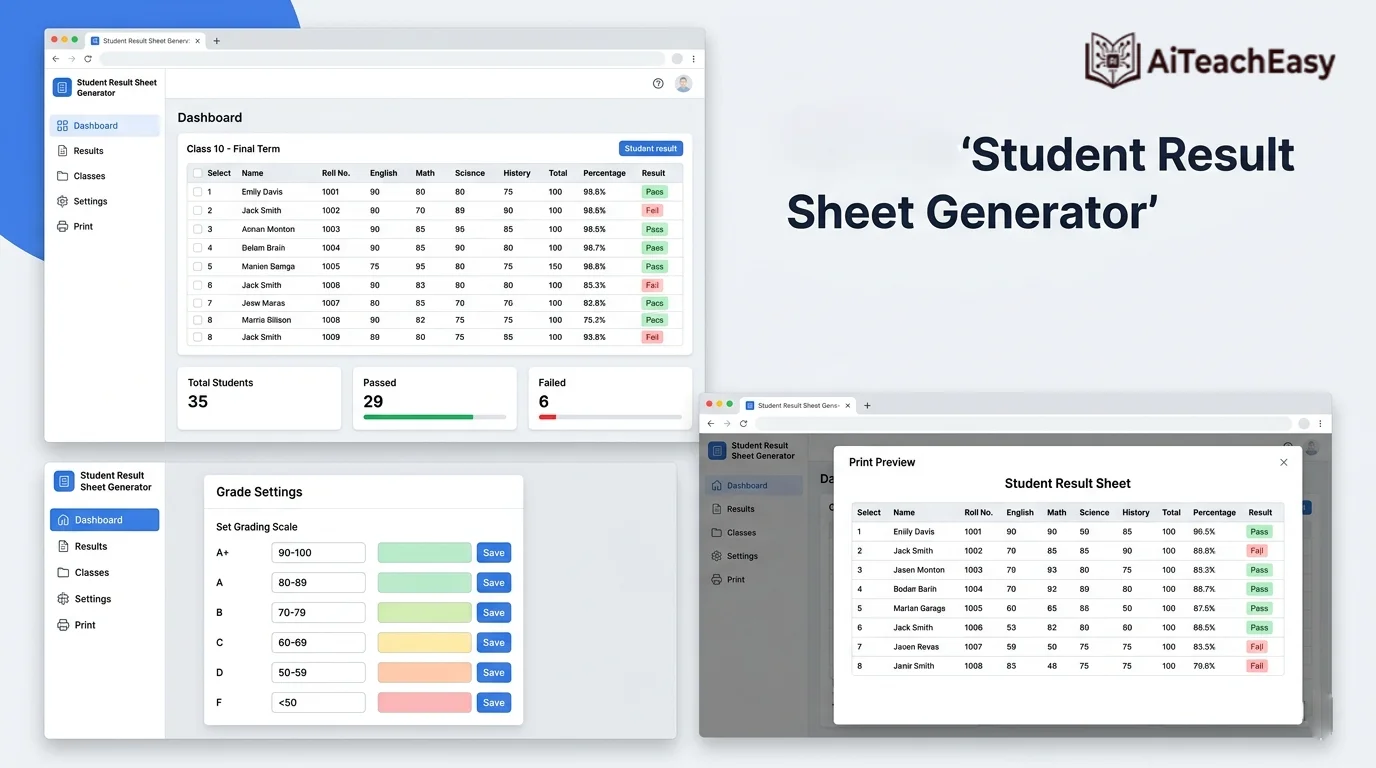
The search for a student result sheet generator free in Excel often leads to frustration. Templates break, formulas fail, and hours vanish. Our online result sheet generator offers a smarter path: instant setup, zero errors, and features like GPA calculator for teachers, digital gradebook, and student performance analytics – all free.
Think of it as your personal automated grading script that handles the heavy lifting while keeping you in control. Export to Excel when you need it, print PDFs for parents, and save everything locally. No cloud uploads, no data risks, no learning curve.
Try it today. Spend less time wrestling with spreadsheets and more time focusing on what matters: your students.