
7 Best AI Classroom Management Tools for Teachers
Let’s be honest: managing a classroom today is harder than ever. You’re not just teaching; you’re juggling student behavior, differentiating instruction, grading papers, communicating with parents, and trying to keep thirty unique individuals engaged for six hours straight. It’s a lot.
But what if you had a co-pilot? Not a human one (though those are great, too), but an AI assistant that handles the busy work so you can focus on teaching. As education expert Sal Khan, Founder and CEO of Khan Academy, explains, “AI enhances teaching quality rather than replacing educators. Using AI-powered tools, teachers can gain a much-needed assistant to help them with important but time-consuming tasks like lesson planning, assessment grading, and student feedback” (source).
After testing dozens of AI classroom management tools and observing how educators use them in real classrooms, I’ve seen firsthand how these platforms can transform a teacher’s workflow. The best AI classroom management software is changing the game by automating routine tasks, providing insights into student engagement, and helping you create a more organized learning environment. According to HolonIQ, the global AI in education market is projected to surpass USD 25 billion by 2027, underscoring the technology’s immense impact and potential.
I’ve looked at dozens of platforms to find the ones that actually help teachers, rather than just adding another tech headache. Here are the best AI classroom management tools for teachers that can help you reclaim your planning periods and connect better with your students. If you’re looking to expand your toolkit, you might also find our guide on AI tools for teachers helpful for broader classroom applications.
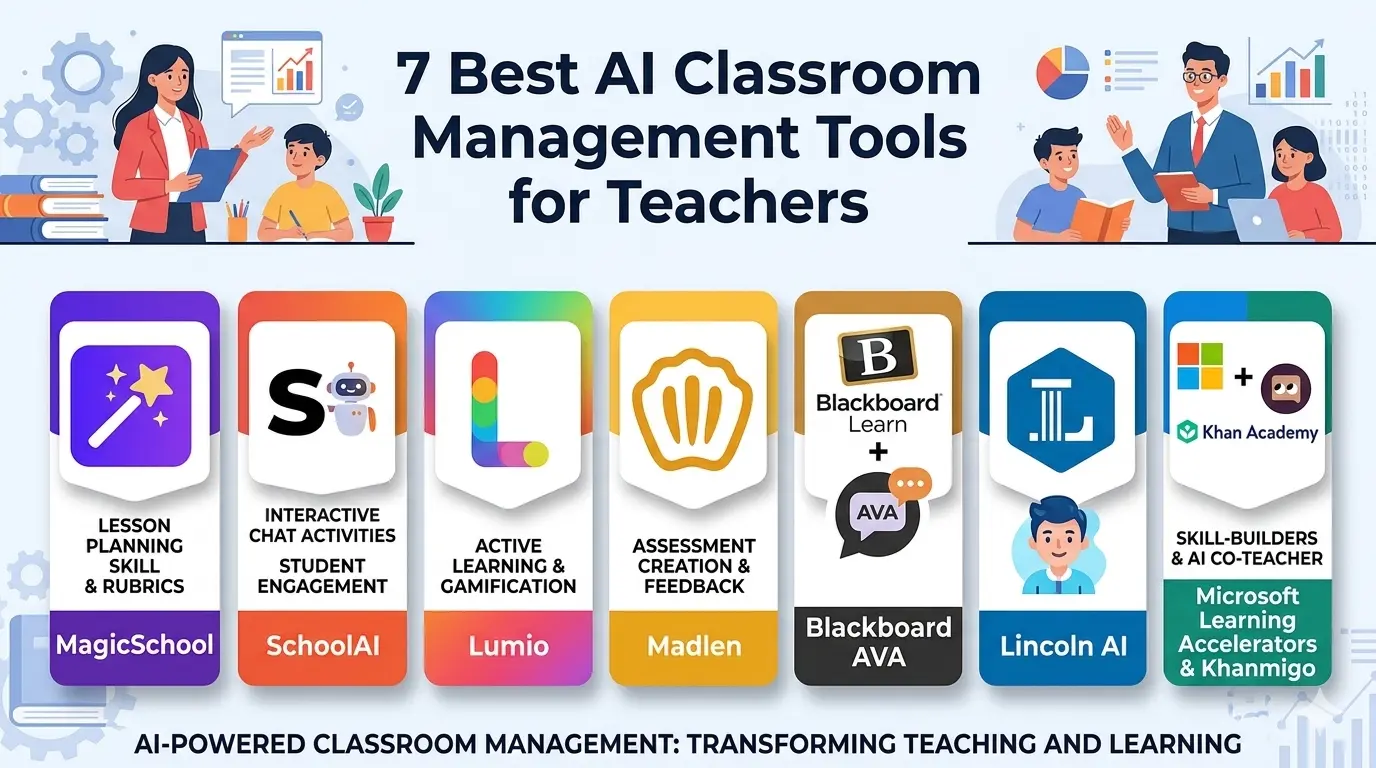
Table of Contents
What Are the Best AI Classroom Management Tools?
AI classroom management software isn’t about robots taking over your whiteboard. Instead, it uses machine learning and automation to handle the administrative and repetitive parts of teaching. Think of it as a suite of AI education technology tools that help with everything from creating lesson plans and generating quizzes to monitoring student progress and even analyzing classroom engagement in real-time.
A systematic review published in ScienceDirect analyzed 104 studies on AI in classroom management and found that these technologies—particularly machine learning and deep learning—are increasingly used for tasks such as attendance tracking, behavior monitoring, and engagement assessment. The research highlights that these tools can streamline classroom management and offer detailed insights into student behavior.
These classroom management AI platforms learn from data—like how students perform on quizzes or how they interact with digital content—to give you personalized recommendations. Whether you’re in a physical classroom, a hybrid setup, or fully online, these tools are designed to make your workflow smoother and your instruction more impactful.
Benefits of the Best AI Classroom Management Tools for Teachers
Why should a busy teacher consider adding another tool to their stack? Because the right AI classroom automation tools don’t add to your workload; they subtract from it. A collaborative forecast by HolonIQ and McKinsey suggests that AI-powered tutors could automate up to 20-30% of teacher tasks, including grading and lesson planning. Here’s how these smart classroom management tools help:
- Save Hours on Planning: AI teacher productivity tools can generate a standards-aligned lesson plan or a set of quiz questions in seconds—a task that might normally take an hour. For quick lesson creation, our free AI lesson plan generator tool is a great place to start.
- Personalize Learning at Scale: It’s impossible to give every student a custom worksheet, but AI can. AI-powered classroom management software for schools can adapt content to suit different reading levels or learning styles, making it easier to support every kid in the room. Personalized learning platforms like Khan Academy’s Khanmigo are scaling rapidly, with a 40%+ annual growth rate in adoption (source).
- Gain Insight into Engagement: New AI classroom monitoring tools use analytics to show you which students are zoning out or struggling, allowing you to intervene right when they need you, not after the test. This kind of intelligent classroom management solution is invaluable for data-driven teaching. However, the ScienceDirect review notes that only 16% of studies leveraged AI’s full potential for real-time feedback.
- Improve Communication: Drafting clear emails to parents or creating weekly newsletters is time-consuming. Many top AI classroom management tools now offer features to help you write those communications faster and effectively.
Best AI Classroom Management Tools for Teachers
Ready to see them in action? Here’s my list of the best AI classroom management tools for teachers, based on features, usability, and how they perform in real classrooms. Many of these also integrate well with the best free AI note takers we’ve reviewed, helping you keep track of everything.
Independent research from Stanford University’s SCALE Initiative analyzed more than 9,000 teachers new to AI platforms and found that over 50% used AI tools for 5+ days in their first 90 days, with 42% becoming regular or power users. This demonstrates how quickly teachers are embracing these technologies when they provide real value.
1. MagicSchool
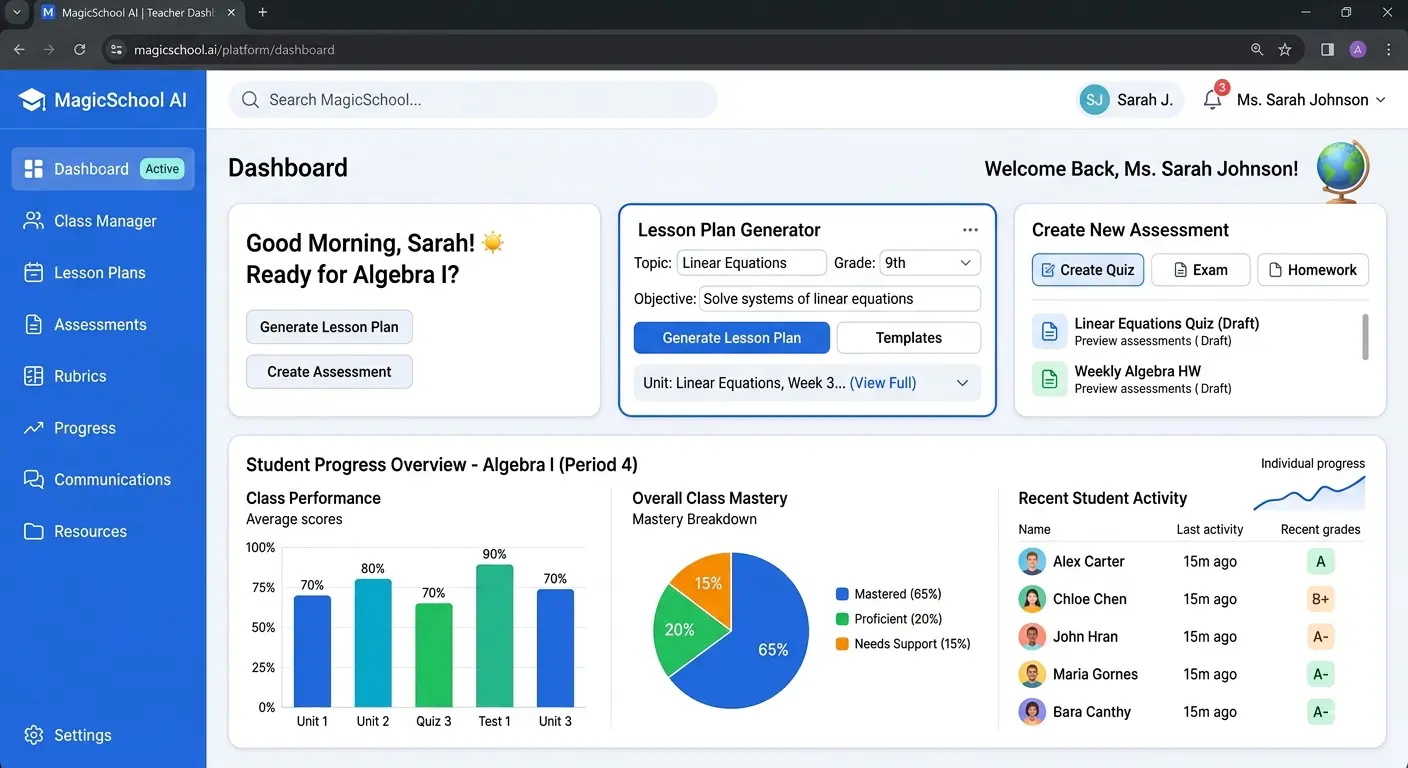
MagicSchool is one of the most popular AI teacher assistant tools on the market, and for good reason. It was built specifically by educators for educators. It’s not just one tool; it’s a platform with over 60 different AI tools designed to handle almost every task a teacher faces.
- Key Features:
- Lesson Plan Generator: Create complete, standard-aligned lesson plans in minutes.
- Assessment Creator: Generate quizzes, rubrics, and even report card comments.
- IEP & Parent Communication: Draft individualized education program (IEP) goals or write a tricky email to a parent.
- Content Differentiator: Level a text so it’s accessible to struggling readers or translate materials for English language learners.
- How Teachers Can Use It: Imagine you’re about to teach a complex concept like photosynthesis. You can use MagicSchool to generate a “rap battle” version of the text for your struggling readers and a “breaking news brief” version for your advanced kids—all in about 30 seconds.
- Pros:
- Extremely easy to use with a clean interface.
- Tools are specifically designed for teacher workflows.
- Robust free version.
- Cons:
- Can feel overwhelming due to the sheer number of tools.
- Outputs are only as good as the prompts you write.
- Best for: Teachers who want an all-in-one content creation and planning assistant.
2. SchoolAI
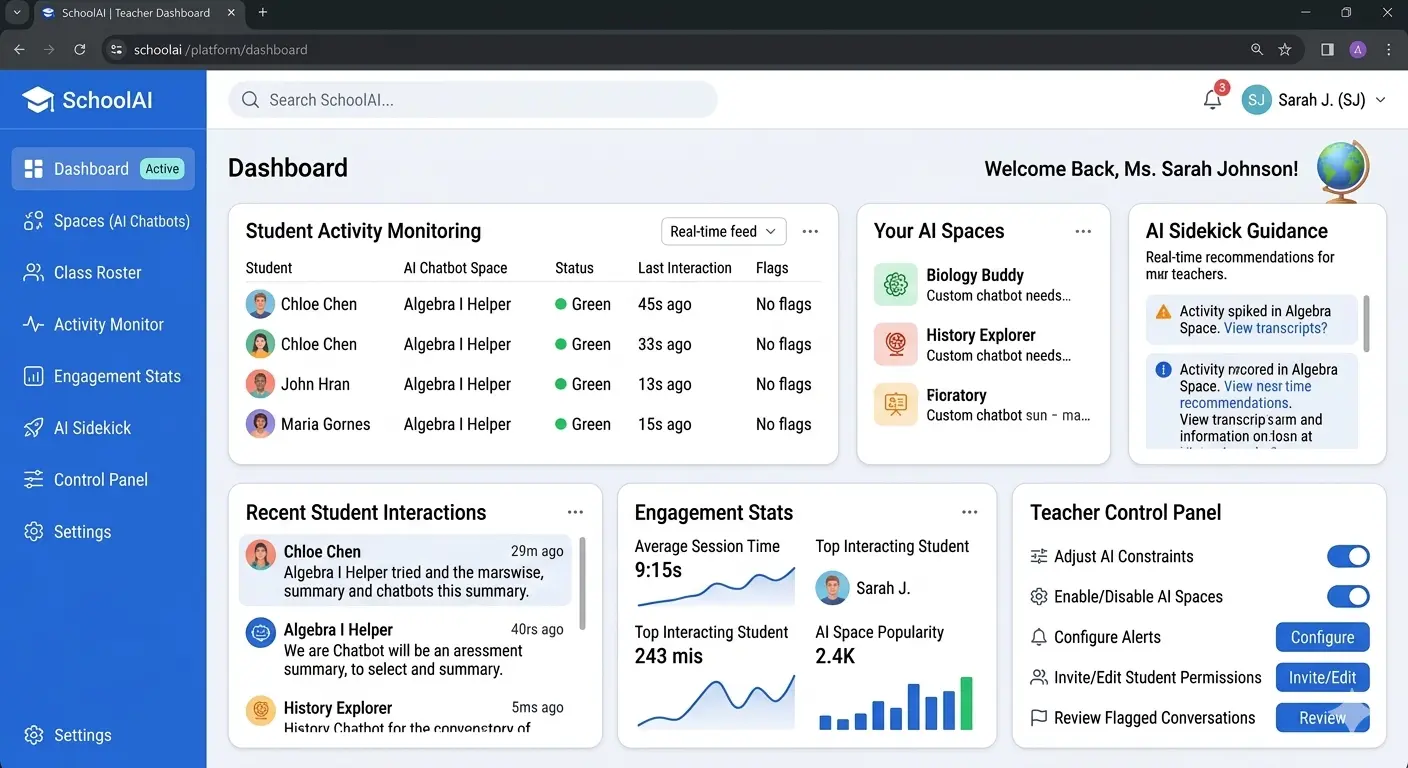
While MagicSchool is teacher-facing, SchoolAI is designed to put AI directly into students’ hands in a safe, controlled way. It allows teachers to create “Spaces”—custom AI chatbots focused on specific learning tasks. This makes it a fantastic tool for fostering AI literacy while supporting the Universal Design for Learning (UDL) framework. It’s a prime example of how AI tools for classroom collaboration can work in a safe environment. The Stanford research found that SchoolAI users didn’t just stick to one part of the platform but actively explored the full range of features, showing the potential for AI to be integrated into multiple aspects of teaching.
- Key Features:
- Custom Chatbots (Spaces): Create a chatbot that acts as a historical figure, a debate opponent, or a subject-specific tutor.
- Sidekick Feature: A personalized tutor that you can limit to ensure it doesn’t do the student’s work for them, just guides them.
- Built-in Accessibility: Includes text-to-speech and speech-to-text tools to support diverse learners.
- How Teachers Can Use It: During a writing unit, you can set up a “Sidekick” that helps students brainstorm ideas or check their use of figurative language, but you can program it not to write any sentences for them. This keeps the learning in their hands.
- Pros:
- Safe, monitored environment for student AI use.
- Promotes critical thinking and responsible AI interaction.
- Highly engaging for students.
- Cons:
- Requires more setup and oversight than teacher-only tools.
- Best for: Teachers looking to integrate AI into student-led activities and research projects. It can also be a great support for students who use AI tools for special needs students.
3. Lumio by SMART Technologies
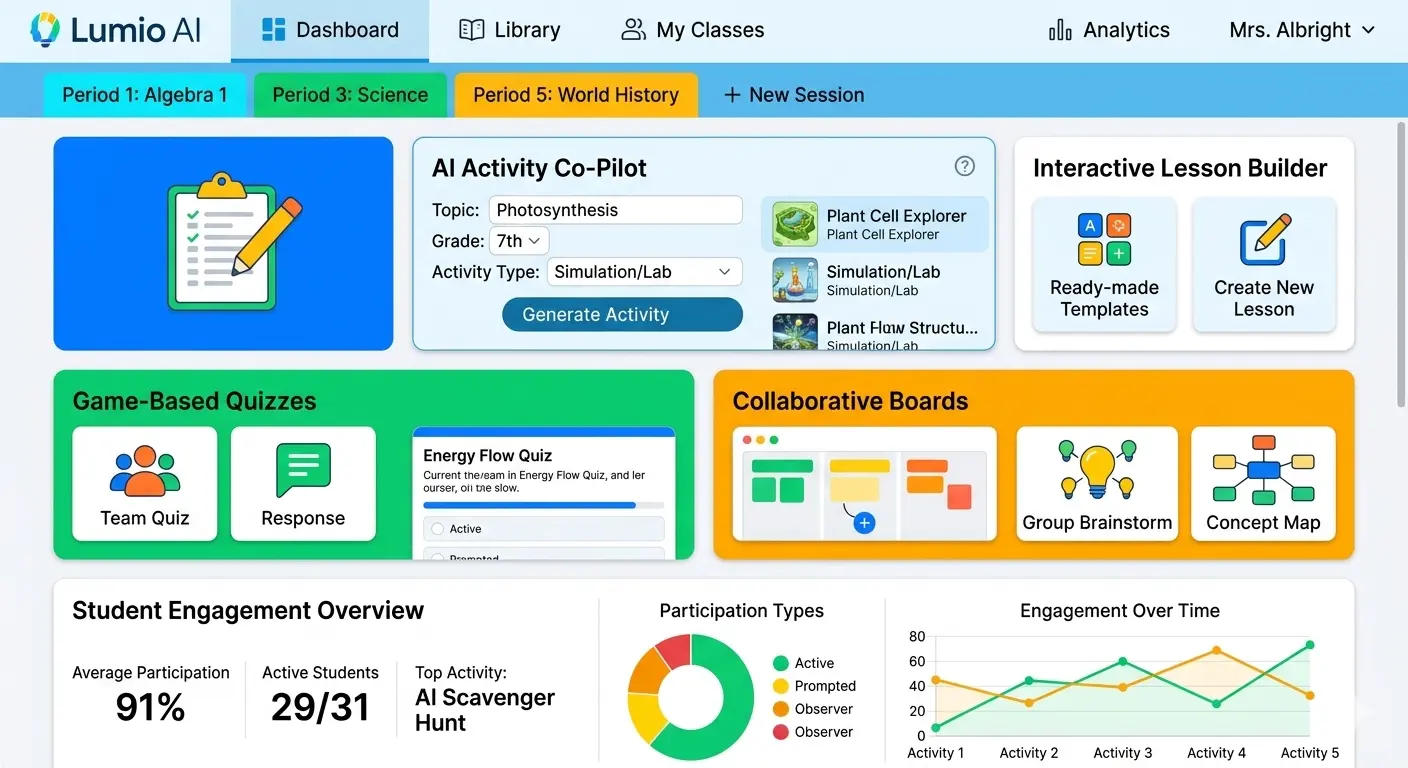
Lumio takes a slightly different approach. It’s a cloud-based learning platform that helps turn static lessons into interactive, collaborative experiences. With its new AI Assist feature, it helps teachers build those engaging activities faster than ever. It’s one of the best automated student engagement tools available.
- Key Features:
- AI Assist: Quickly generates discussion prompts, quizzes, and interactive activities like “Monster Quiz” or “Game Show” based on your topic.
- Class Sessions: Allows you to manage and deliver lessons to multiple classes at once, keeping student responses separate for easy review.
- Collaborative Workspaces: Students can contribute to a shared board from their own devices.
- How Teachers Can Use It: At the end of a unit, instead of spending an hour making a review game, you type the topic into AI Assist, and it generates a “Speedup” race or “Game Show” activity for the whole class in seconds.
- Pros:
- Makes lessons highly interactive and fun.
- Great for both in-person and hybrid classrooms.
- Free version available with generous storage.
- Cons:
- Some advanced features may require a paid subscription.
- Best for: Teachers who want to boost engagement and turn passive lessons into active learning experiences.
4. Madlen
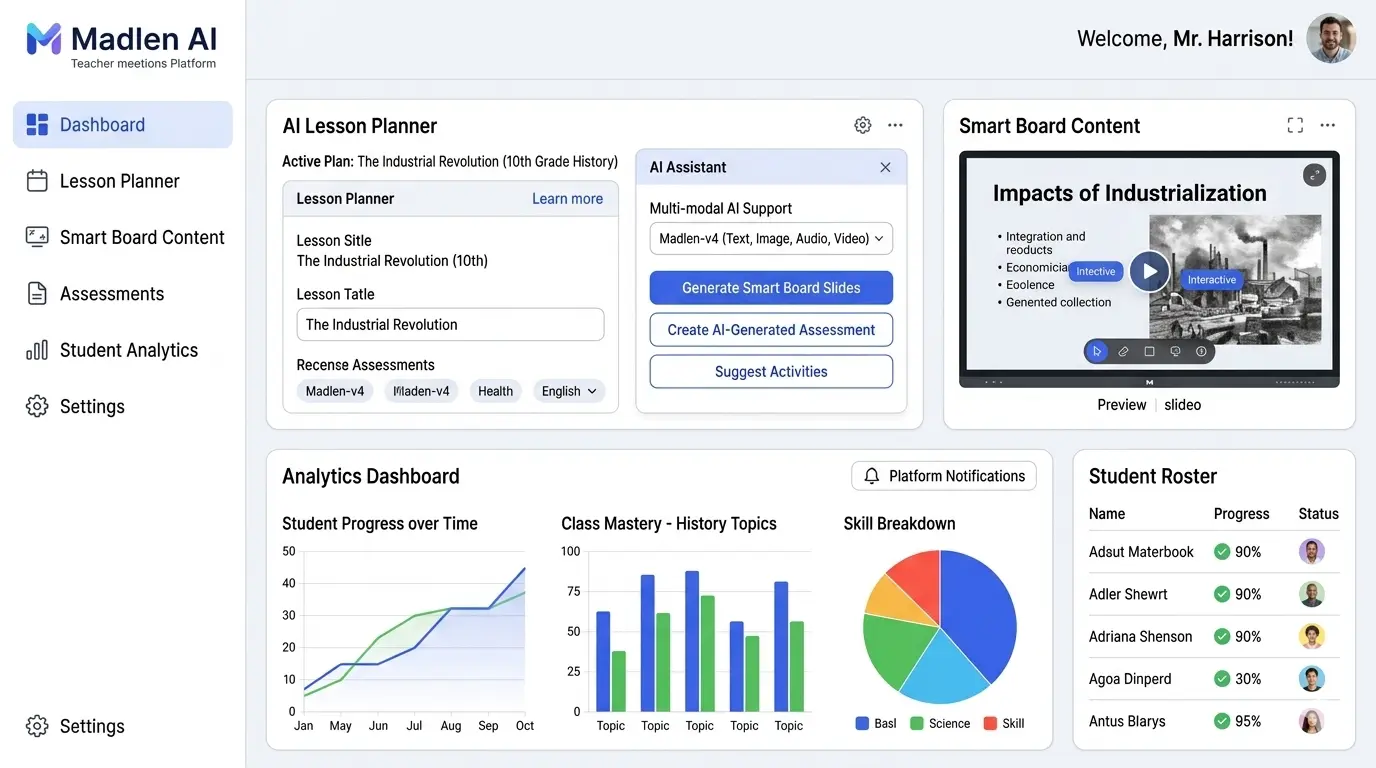
Madlen is an emerging global platform designed as an end-to-end AI copilot for teachers. It supports the entire teaching cycle—before, during, and after the lesson. What sets Madlen apart is its deep integration with multiple leading AI models (like Gemini and ChatGPT) and its focus on curriculum alignment.
- Key Features:
- Multi-Model AI: Leverages the best of different AI engines within one platform.
- End-to-End Support: Helps with lesson planning, creating interactive content for smart boards, assigning assessments, and grading.
- Advanced Analytics: Provides dashboards to track individual and class-wide progress.
- Handwriting Recognition: Can evaluate handwritten student submissions.
- How Teachers Can Use It: A teacher can plan a lesson on the web platform, project interactive content during class, and then assign personalized homework through the student app—all within the same ecosystem.
- Pros:
- Comprehensive, all-in-one solution.
- Strong focus on personalizing the learning path for each student.
- Offers free access for teachers to try.
- Cons:
- Newer to the market, so community size is still growing.
- Best for: Schools looking for a cohesive, curriculum-aligned AI platform for both teachers and students. Its analytics can also aid in AI tools for student retention by identifying at-risk learners early.
5. Blackboard’s Anthology Virtual Assistant (AVA)
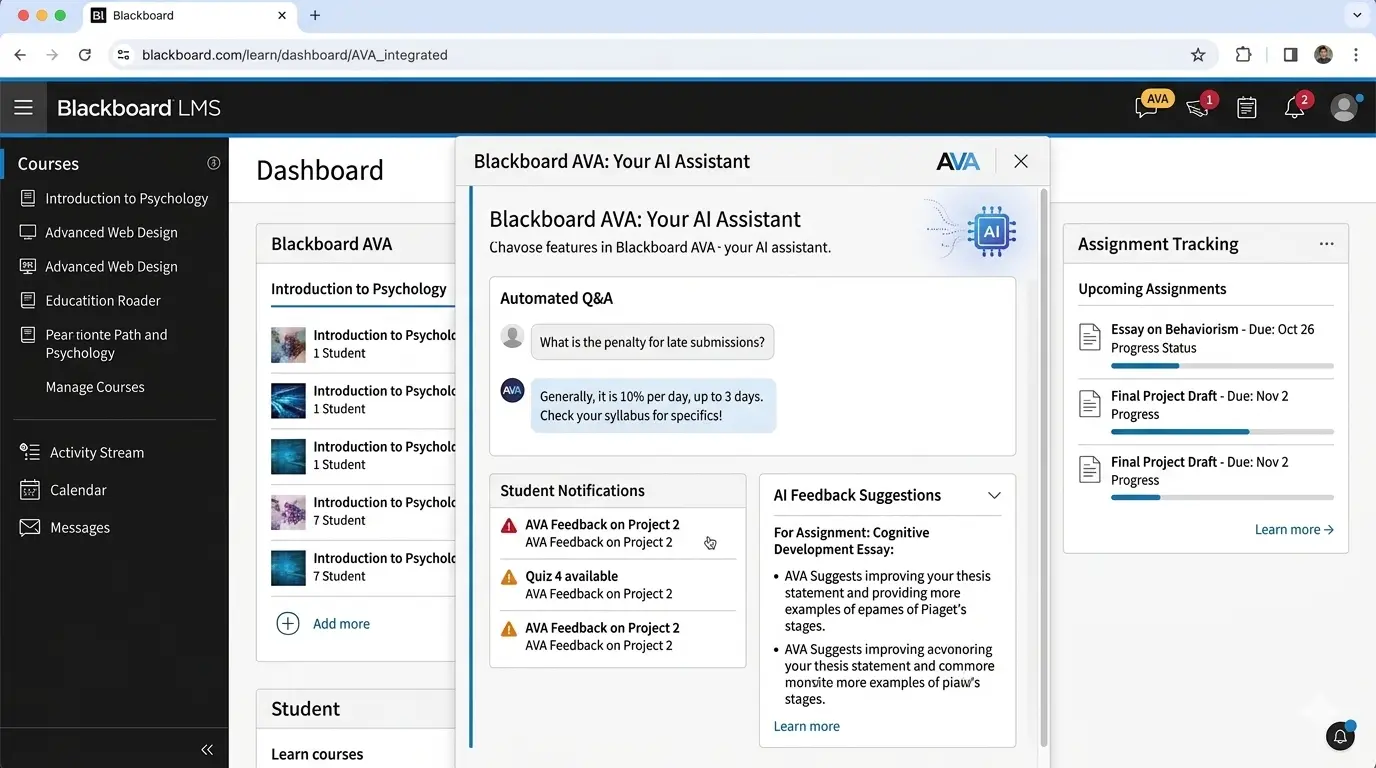
For those in higher ed or K-12 districts using the Blackboard LMS, the new Anthology Virtual Assistant (AVA) is a game-changer. It embeds AI directly into the learning management system to support both instructors and students.
- Key Features:
- AVA Responses: Answers common student questions instantly by referencing course materials, saving instructors from answering the same email 50 times.
- AVA Automations: Sends personalized nudges to students (e.g., “Great job on that quiz!” or “Don’t forget to log in this week”).
- Feedback Assistant: Summarizes rubric feedback or rewrites instructor notes into polished, constructive comments for students.
- AI Design Assistant: Helps format documents and suggests visuals to make course content more engaging.
- How Teachers Can Use It: When a student panics at 10 p.m. about an assignment deadline, AVA Responses can immediately pull the due date and rubric from the syllabus, giving them the answer without an email.
- Pros:
- Seamlessly integrated into an existing LMS.
- Free trial for current Blackboard customers through June 2026.
- Designed with transparency and ethics in mind.
- Cons:
- Primarily useful only for schools already using Blackboard.
- Best for: Universities and school districts heavily invested in the Blackboard ecosystem.
6. Lincoln AI
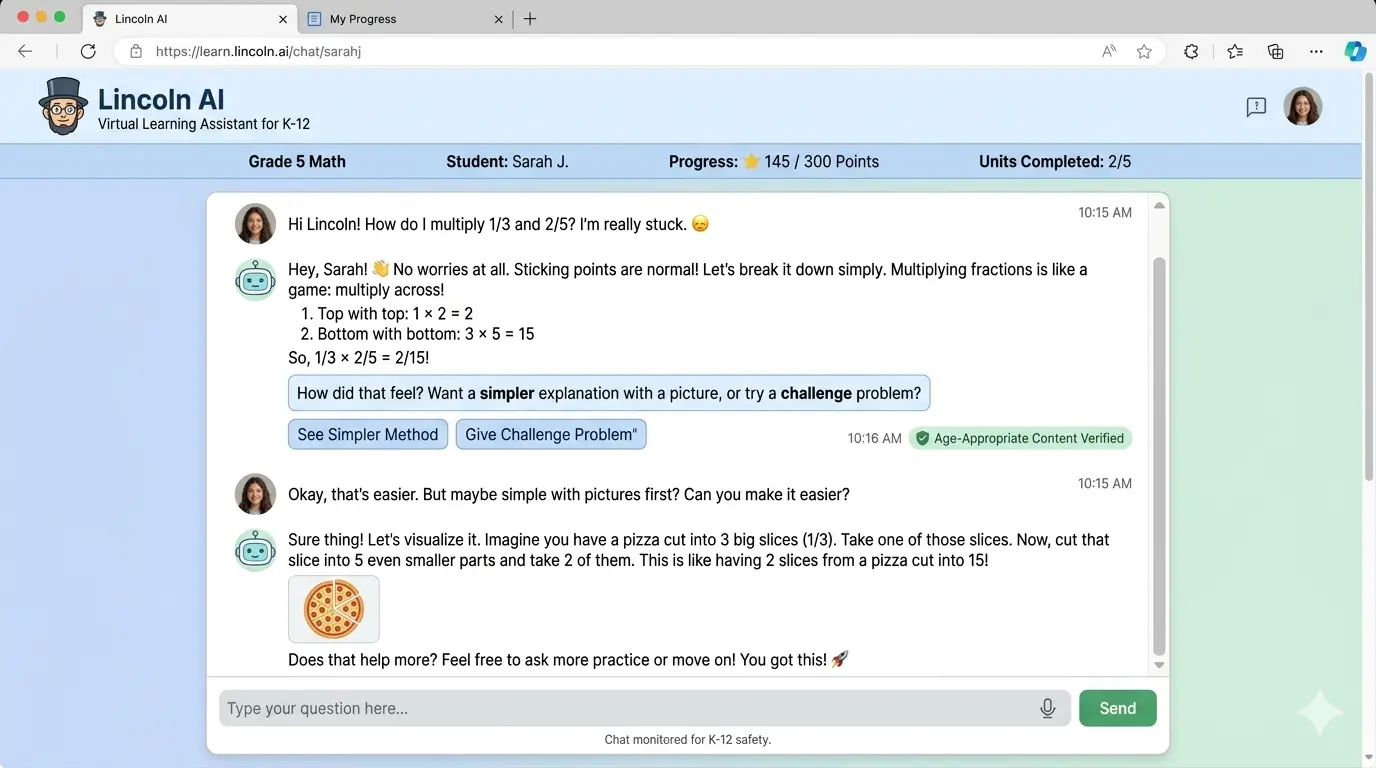
Lincoln AI is a unique K-12 virtual learning assistant trained specifically on the Lincoln Empowered curriculum. This curriculum-first design means its responses are not generic; they are standards-aligned and academically rigorous.
- Key Features:
- Curriculum-Aligned: Trained on accredited digital content, ensuring accuracy.
- Voice or Text Interaction: Students can talk to it like a person, which increases engagement.
- Dynamic Adjustment: The AI adjusts the difficulty and direction of the conversation based on student responses.
- Safety Guardrails: Built on AWS with strong privacy protections.
- How Teachers Can Use It: When a student gets stuck on a math problem during independent work, they can ask Lincoln AI for help. The assistant guides them back on track without giving away the answer, preventing frustration and allowing the teacher to work with a small group uninterrupted.
- Pros:
- Highly trustworthy content because it’s tied to a vetted curriculum.
- Boosts student confidence and independence.
- Cons:
- Tied to the Lincoln Empowered curriculum, so it may not be a fit for all schools.
- Best for: Schools using the Lincoln Empowered curriculum or those seeking a highly controlled, safe AI tutor.
7. Microsoft Learning Accelerators & Khanmigo
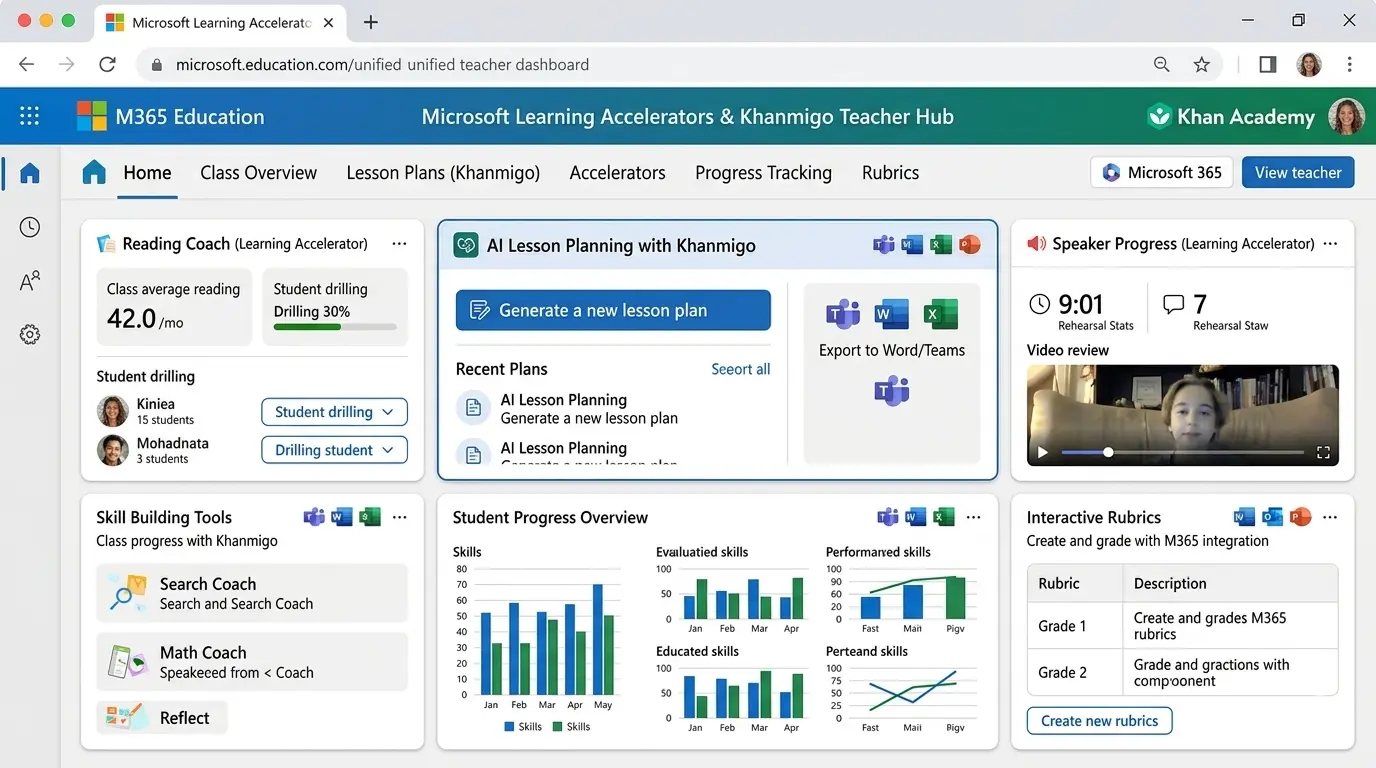
Microsoft offers a suite of free tools integrated into its ecosystem that act as powerful AI tools for classroom collaboration and skill building. Additionally, their partnership brings Khanmigo for Teachers to the table, which is a fantastic free planning tool. Andreas Schleicher, Director for Education and Skills at OECD, believes “AI can revolutionize education by making learning more engaging, personalized, and effective for all students.”
- Key Features:
- Microsoft Learning Accelerators: Tools like Reading Coach (personalized reading practice) and Speaker Progress (helps students build presentation skills) are free and integrated into Microsoft 365.
- Khanmigo for Teachers: A free AI tool that helps teachers create lesson plans, generate rubrics, and write class reports. It’s like having a Khan Academy-trained teaching assistant.
- Copilot Chat: Securely use AI for web-based research and summarization within your school’s data protections.
- How Teachers Can Use It: A teacher can use Khanmigo to quickly draft a project-based learning rubric. Then, students can use Speaker Progress in Teams to practice and get feedback on a presentation before they ever have to stand up in front of the class.
- Pros:
- Many tools are completely free.
- Seamlessly integrates with tools schools already use (Microsoft 365, Teams).
- Cons:
- Requires a Microsoft-focused school environment for full effect.
- Best for: Schools already using Microsoft products who want free, high-quality AI integrations.
Quick Comparison: Top AI Classroom Management Tools
| Tool | Best For | Free Version | Key Feature |
|---|---|---|---|
| MagicSchool | Lesson planning & content creation | Yes | 60+ specialized teacher tools |
| SchoolAI | Safe student-AI interaction | Yes | Customizable “Spaces” chatbots |
| Lumio | Boosting classroom engagement | Yes | AI-assisted interactive activities |
| Madlen | End-to-end classroom workflow | Limited | Multi-model AI & curriculum alignment |
| Blackboard AVA | LMS integration (Blackboard) | Trial | Automated student Q&A and nudges |
| Lincoln AI | Curriculum-aligned tutoring | No | Trained on Lincoln Empowered content |
| Microsoft Learning Tools | Free skill-building & planning | Yes | Deep integration with Microsoft 365 |
Free AI Classroom Management Tools
You don’t need a big budget to get started. Several platforms offer robust free AI classroom management tools that can make a real difference:
- MagicSchool: Offers a very generous free version with access to most of its core planning tools.
- Google Classroom: While not “AI” in itself, its integration with Google’s AI tools and its free, powerful assignment management system makes it a staple for classroom organization. Pair it with browser-based AI tools for students for a powerful combo. Many schools also integrate these tools with learning platforms like Google Classroom and Microsoft Teams to create a fully connected digital classroom environment.
- Microsoft Learning Accelerators: Completely free for schools, providing AI-powered tools for reading, speaking, and math practice.
- Canva for Education: Free for K-12 teachers, and its Magic Studio AI tools (like Magic Write for generating text) can help you create stunning classroom materials in seconds. You can even use it to create visuals for best free AI presentation tools.
- SchoolAI: Offers free tiers for teachers to create and manage “Spaces” for their students.
How the Best AI Classroom Management Tools Improve Engagement
Keeping students engaged is the holy grail of teaching. AI helps by making learning active and responsive. Classroom engagement AI tools work by:
- Gamifying Learning: Platforms like Lumio use AI to help teachers quickly create quiz games and collaborative challenges that feel more like play than work.
- Providing Instant Feedback: Tools like Lincoln AI or Blackboard AVA give students instant answers and guidance, keeping their momentum going instead of stalling out while waiting for help. This is similar to how best free AI homework helper tools for students provide on-demand support.
- Increasing Participation: AI classroom monitoring tools used in some schools can track attentiveness, giving teachers data on which students are disengaged so they can adjust their teaching in real-time. In a pilot program, this type of tech led to a 25% increase in active classroom participation. This is a key feature of modern intelligent classroom management solutions. However, the ScienceDirect review emphasizes that ethical considerations must be addressed, noting that only 22% of studies addressed ethical concerns like privacy and algorithmic bias.
Best AI Tools for Managing Online Classrooms
Managing a virtual classroom presents unique challenges, but AI tools for managing online classrooms are specifically designed to bridge the gap.
- Blackboard (with AVA): Helps manage the flood of logistical questions, keeping the online classroom organized and reducing student frustration.
- Madlen: Provides a unified platform where teachers can plan, deliver, and assess, ensuring that online students have the same structured experience as in-person ones.
- NotebookLM & ChatPDF: These free tools are lifesavers for online learning. Students can upload complex readings and use AI to summarize them, ask questions, and generate study guides, making independent online work much more manageable. For students concerned about data, we also have a list of privacy-first AI tools for students that are great for this.
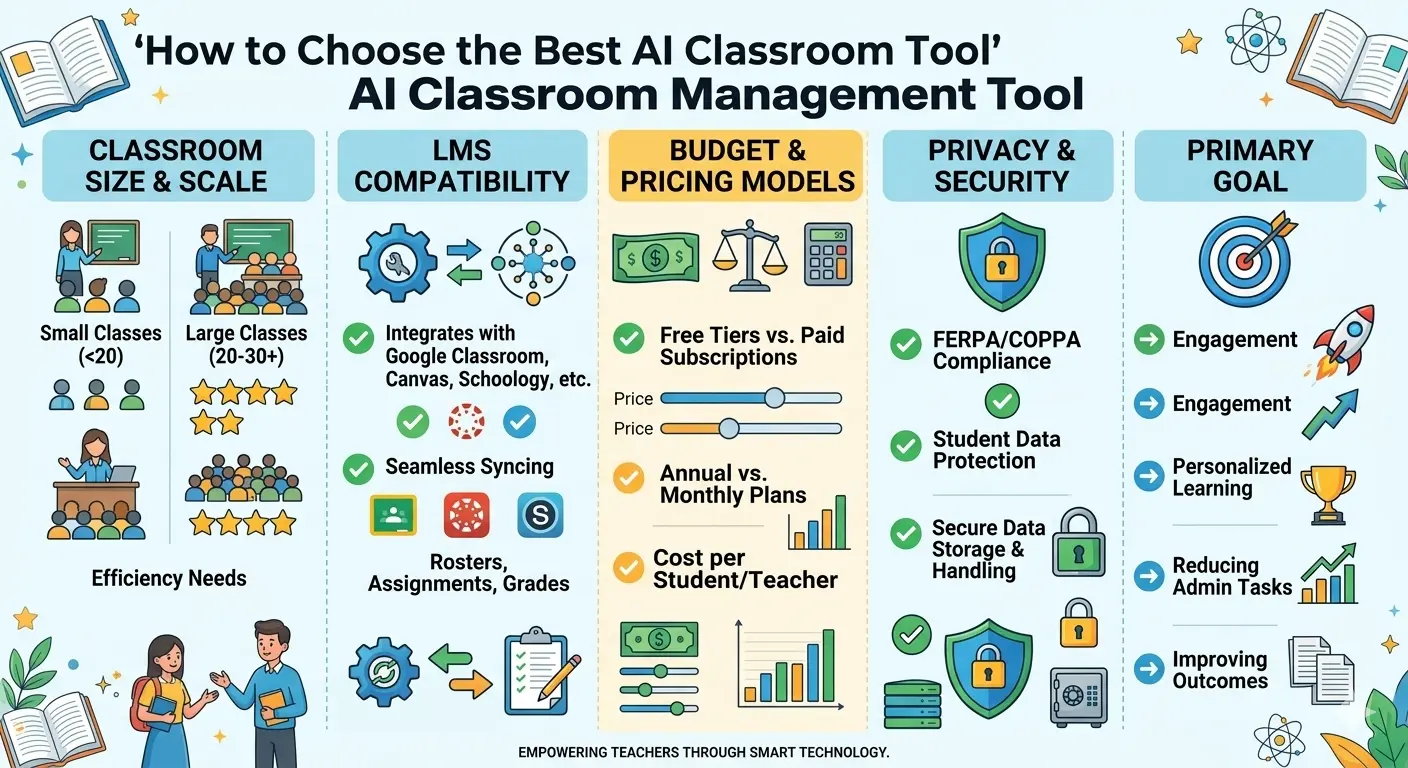
How to Choose the Best AI Classroom Management Tool
With so many options, selecting the right AI classroom management software can feel overwhelming. UNESCO’s Guidance for Generative AI in Education emphasizes that institutions should validate the pedagogical and ethical suitability of AI tools before adoption. Here’s a simple framework to help you decide:
- Classroom Size & Level: An elementary teacher with 25 students has different needs than a high school teacher with 150. Tools like MagicSchool scale well for planning, while SchoolAI is great for managing individual student interactions.
- LMS Compatibility: If your school uses Canvas, Blackboard, or Google Classroom, look for tools that integrate directly (like Blackboard AVA or tools that work well alongside Google).
- Budget: Start with the free AI classroom management tools listed above. Most paid tools offer trials, so test before you commit.
- Privacy & Security: This is non-negotiable. Ensure the tool is FERPA and COPPA compliant. Check if the tool uses student data to train its models and if that data is anonymized. UNESCO’s Prep-AI project is working globally to enhance capacity for ethical AI adoption in education.
- Primary Goal: Are you trying to save planning time (MagicSchool, Khanmigo), increase engagement (Lumio), or provide direct student support (Lincoln AI, SchoolAI)? Let your main goal guide your choice.
Pros and Cons Summary of AI Classroom Management Tools
Before you make a final decision, it helps to look at the big picture. Here’s a balanced overview of what these AI classroom productivity tools bring to the table.
Pros of Using AI Classroom Management Tools:
- Save significant time on lesson planning, grading, and routine tasks. Research suggests AI could automate 20-30% of teacher tasks.
- Automate feedback and assessment, giving students quicker insights.
- Improve classroom engagement through interactive and gamified learning.
- Personalize learning for students at different skill levels. Personalized learning platforms are growing at over 40% annually.
- Provide real-time data on student performance and participation.
Possible Limitations:
- Some advanced tools require paid subscriptions that may not fit every school’s budget.
- Schools must carefully review privacy policies to ensure student data is protected. Only 22% of AI classroom studies adequately address ethical concerns.
- Teachers may need time to learn new software and integrate it into existing workflows.
- AI tools are assistants, not replacements—they work best when combined with teacher expertise.
Conclusion
Integrating AI into your classroom isn’t about replacing the human connection that makes teaching meaningful. Instead, it helps teachers save time, automate repetitive tasks, and focus more on student learning.
The best AI classroom management tools help educators reduce administrative work, improve classroom organization, and support student success. According to HolonIQ, the global AI in education market could exceed $30 billion by 2030, showing how rapidly these technologies are evolving.
Whether you choose MagicSchool for lesson planning, Lumio for engagement, or Khanmigo for tutoring, the goal remains the same: helping teachers work smarter and support students more effectively.